🫅 Proxy-Based Profiles
This feature allows for profile-specific progress for any type of player data, of any plugin. Some proxy-level workarounds allow you to switch the player's UUID when switching servers, effectively tricking all plugins into thinking that another player joined the server.
This feature has a huge advantage: this makes literally any plugin storing player data compatible with MMOProfiles without the need of having profile-specific code, which is known to be a very tedious task. More on that later.
INFO
UUID Spoofing has already been implemented in some plugins in the past, most of them being outdated now. MMOProfiles provides an up-to-date solution, packed with all of the other most important MMOProfiles features, namely configurable GUI-based profile selection and compatibility with the MMO plugin suite.
You'll need at least one proxy and two backend servers in order to use this feature.
Why such a feature?
As you might know, it is hard for MMOProfiles to be compatible with literally every plugin out there. Supporting profile-based player data requires some heavy modifications to any plugin codebase - it requires the plugin to wait for MMOProfiles to provide a UUID, before making a database request based on that UUID.
This is quite hard to do for plugins outside of the MMO plugin suite. Although we have provided a well structured and open-source profile API for other developers to build against MMOProfiles, we of course cannot expect other developers to natively support it - which is why we've been working on a solution which requires no effort from any other developer.
How do I enable it?
The following tutorial works on the assumption that you already know about proxies and MySQL databases. If that's not the case, you won't be able to understand it.
On your Velocity proxy server
- Install the latest version of MMOProfiles. The main JAR file contains both a Spigot plugin and a Velocity plugin.
- Install the latest version of PacketEvents. It is a hard dependency for proxy-based profile selection.
- In your Velocity config, set the
force-key-authenticationoption tofalse.
On your backend servers
Follow these steps on all of your backend servers where you want to enable proxy-based profile selection.
- Install the latest version of MMOProfiles and MythicLib. If you have other MMO plugins installed, make sure they're up to date.
- Make sure SQL data storage is enabled in your MMOProfiles config, and that all of your backend servers point to the same SQL database.
- On 1.19+, you will also need to install FreedomChat. These plugins fix an issue with signed chat, preventing players from being kicked the moment their send a message in the chat.
- Set
enforce-secure-profiletofalseinserver.properties.
INFO
You do not need MythicLib installed on your proxy server. You do not need PacketEvents installed on any of your backend servers.
This currently only works on Velocity (BungeeCord support is planned) and the only supported backend server version is 1.20.2+ (1.16-1.19 support is also planned but requires adapting the code to older versions of the Minecraft protocol).
Config Files
The MMOProfiles JAR file contains the source codes of two different plugins: one for the Velocity proxy server and one for the Spigot/Paper backend servers. Therefore, there are now two types of config to setup: one for the proxy servers, and one per backend server.
Proxy Server Config
This config file is located under <velocity_root>\plugins\mmoprofiles_velocity.
Full config snippet
# Players will be kicked (from the server, NOT the network) when
# trying to join these backend servers with no profile selected.
#
# If the player is already connected to the proxy, they will not
# be kicked from the proxy, and will be redirected to another server.
kick_if_no_profile:

  # Backend servers where this option is active
  # !! Server names from the Velocity config.toml !!
  servers:
    - play

  # Message displayed to players
  kick_message: 'Please first select a profile.'

# This option is for lobby servers. Players will have their
# profile unselected when joining these backend servers.
# !! Server names from the Velocity config.toml !!
unselect_profile_on_login:
  - lobby
kick_if_no_profile is useful to prevent players from joining a server without selecting a profile. It is a list of server IDs.
unselect_profile_on_login is useful to have players return to their official UUID when joining a lobby server. This way, they are forced to unselect their profile and temporarily not use their inventory, profile-specific progress, etc...
Backend Server Config
This config file is located under <spigot_root>\plugins\MMOProfiles.
Full config snippet
# When enabled, MMOProfiles switches to a proxy-based behaviour, enabling
# players to switch UUIDs. This tricks other plugins into thinking another
# player is joining the server, enabling profile-specific progress with
# literally ANY plugin.
#
# !! WARNING risk of data loss !!
# Please check the documentation before enabling this option to understand
# exactly what you are doing. If misconfigured, you can damage your player data.
# !! WARNING !!
proxy_based_profiles:

  # This option MUST be enabled on every Spigot server.
  enabled: false

  # Servers to where players will be sent to when choosing their profile.
  # When using this option, make sure you force profile selection.
  #
  # When option 'back_to_initial_server' is toggled on, this becomes
  # the list for temporary servers where players will be teleported
  # to have their UUID switched.
  #
  # Leave empty to NOT teleport the player automatically on profile selection.
  # This will leave the player the option to choose the server they would like
  # to play on. As soon as they switch servers (as long as the connection does
  # not fail), the selected profile will be applied.
  target_servers:
    - 'play'

  # When enabled, on profile selection, the player will be sent to the target
  # server before being sent back to the server they came from. Use this option
  # if you want players to BOTH choose their profile AND play in the same server.
  #
  # You need at least two backend servers to run MMOProfiles proxy-based profiles.
  # The player UUID switch can only happen when switching servers, this is why
  # using such a "temporary" server is necessary.
  back_to_initial_server:
    enabled: false
    delay: 10

  # This ONLY WORKS IF proxy-based profiles are enabled.
  #
  # Make sure you toggle on 'synced-data.permissions' otherwise this option is useless.
  # Make sure you have also installed a permission plugin as well as Vault, and that
  # your permission plugin supports Vault.
  #
  # This option dictates how permissions are shared between profiles.
  # Usually, you'll want to share at least admin/rank permissions in case
  # they want to create switch profiles, otherwise these will be lost.
  shared_permissions:

    # By default, you need to provide a list of all the permissions that should
    # be shared between all the different profiles (whitelist behaviour).
    # When toggling on this option, it turns into a blacklist, which means all
    # permissions are shared by default, EXCEPT for the permissions which are
    # present in the following list.
    blacklist_instead: false

    # Whitelist/blacklist of shared permissions.
    list:
      - 'mmocore.admin'
      - 'rank.vip'
      - 'rank.vip_plus'
      - 'rank.mvp'
      - 'rank.mvp_plus'
      - 'group.test'
We will go over this config file in the following section.
Specifications
In most proxy configs, you'll have lobby servers, where players connect when joining your Minecraft proxy, and "play" servers where players will play once they choose their profile.
For play servers
- Make sure to include the ID of the server in the
kick_if_no_profilelist. This way, if a player tries to join this server without selecting a profile, they will be kicked from the server and redirected to the lobby.- This should be used on full RPG servers where players are required to select a profile before playing.
- This option should be disabled on lobby servers and enabled on all of your play servers (it's up to you).
For lobby servers
- Include the ID of the server in the
unselect_profile_on_loginlist. This way, players will return to their official UUID every time they enter this server. This is great for lobby servers which players should join with no profile selected. - You may specify your play servers using the config option
target_servers. These are the servers the players will be teleported to, from the lobby server, right after profile selection.- This is also the option you need to use if you want to toggle on
back_to_initial_server(see below), in which case it will be the list of the temporary servers MMOProfiles will be using to perform that in-and-out UUID switch.
- This is also the option you need to use if you want to toggle on
- By switching on
back_to_initial_server, players will stay on the profile selection server.- Proxies need at least one server switch in order to properly switch the player's UUID, MMOProfiles will first send the player to such "temporary" server, and instantly send them back to the initial server. The UUID switch will be performed on the second server switch.
- If you want your players to only play on one specific server (where they can both select their profile AND play), you can use this temporary server option to have all the players stay on one specific server. You don't need a very performant server backend for such temporary servers, as players will only be joining for a few seconds at most.
- Also, you don't need MMOProfiles installed on these temporary UUID-switch servers.
- Be sure to use a different
server-identifieron lobby servers. You need to set a different identifier name for all your servers that do not have the same map.
The spawn point for new profiles is specified using the new-profile-spawn-point option. Notice that while this option is to be specified in the MMOProfiles config file of the lobby server, this location has to have meaning in the play server. It is the location where players with a new profile will be teleported to.
Supported/Tested Plugins
Permissions
We tested LuckPerms, GroupManager, CorePerms.
CorePerms recommended
CorePerms natively supports MMOProfiles and is the recommended plugin.** Without any additional setup, you can add permissions and groups that will be active both on the selected profile or across all of the player's profiles.
LuckPerms
Official UUID group permission always apply to all Profile UUID. All profile permission ignored when using LuckPerms. But this may not work for some plugins. When this happens, you need to add the permissions directly to the profile uuid.
If you want Official UUID group permissions and Profile UUID permissions work same time, you can use the
MMOProfilesExtraPermsplugin made by CKATEPTb.If you want the permissions added to profiles to take effect immediately, you need to use the
MMOProfilePerms. Plugin made by call911nowplz.
Important LuckPerms note: Since we changed the UUIDs of the players, LuckyPerms shows very long errors in the console, thinking that we pulled the offline player's data from the database. To avoid seeing these errors, simply set vault-unsafe-lookups to true in config.yml.
Problematic plugins
- GroupManager: If deleted permission exists in another profile, it is added again when the server is restarted. We do not recommend using GroupManager.
Money (Vault)
Vault has to be installed in order to support most economy plugins. We tested CoreTools, PlayerPoints, Economy and XConomy.
WARNING
synced-data.balance must be set to false if you want all profiles to have only one shared balance, leaving it to true will make each profile have its own balance.
CoreTools recommended
CoreTools does not require any special configuration and supports MMOProfiles natively.
PlayerPoints
- The
Vaultconfig option must be enabled - MySQL must be enabled and all servers must be connected to the same database
Economy
- Set
StartingBalanceto0 - MySQL must be enabled and all servers must be connected to the same database
XConomy
- Only work with
synced-data.balanceset totrue - Set
UUID-modetoSemiOnline - Set
disable-cachetotrue - MySQL must be enabled and all servers must be connected to the same MySQL database
Quest Plugins
Below you can see the list of quest plugins that we have tested and confirmed to work smoothly. You need to activate MySQL and connect all your servers to the same database.
Storing Items, Backpacks
Make sure that all servers are connected to the same MySQL server.
- MMOInventory recommended
- CoreTools PlayerVaults recommended CoreTools does not require any special configuration and supports MMOProfiles natively.
- Minepacks
- EPIC BackPacks
- Bank
Skyblock
- BentoBox Working properly. All profiles have separate islands. https://www.youtube.com/watch?v=N2xzzcDeTyU
- Iridium Skyblock Working properly. All profiles have separate islands. https://www.youtube.com/watch?v=iht7P-ac-rI
- SuperiorSkyblock2 Not working properly. All profiles only see you as a same player.
Others
- Races of Thana
- CoreTools PlayerVaults, Variables and AuctionHouse features natively support MMOProfiles.
Recommendations
- Make sure your lobby server is in
unselect_profile_on_login. In this way, players return to the official UUID every time they enter this server. The permissions or money you add while the player is not online will be updated when the player is online.- If you want players to select profiles on the lobby server but turn off teleporting automatically, simply set
target_servers: [] - If you want to not show the character selection in your lobby server, you can activate
no-gui-on-login - Since the player official UUID has returned, sharing the money and permissions you sell in in-game stores with other profiles will be seamless.
- SharedPermissions you added to any profile is not official UUID will be lost. Always add SharedPermissions to official UUID only.
- When the player is not online, the vault money you add outside of the official UUID will not be shared with other profiles until the profile is selected.
- If you want players to select profiles on the lobby server but turn off teleporting automatically, simply set
Usage examples
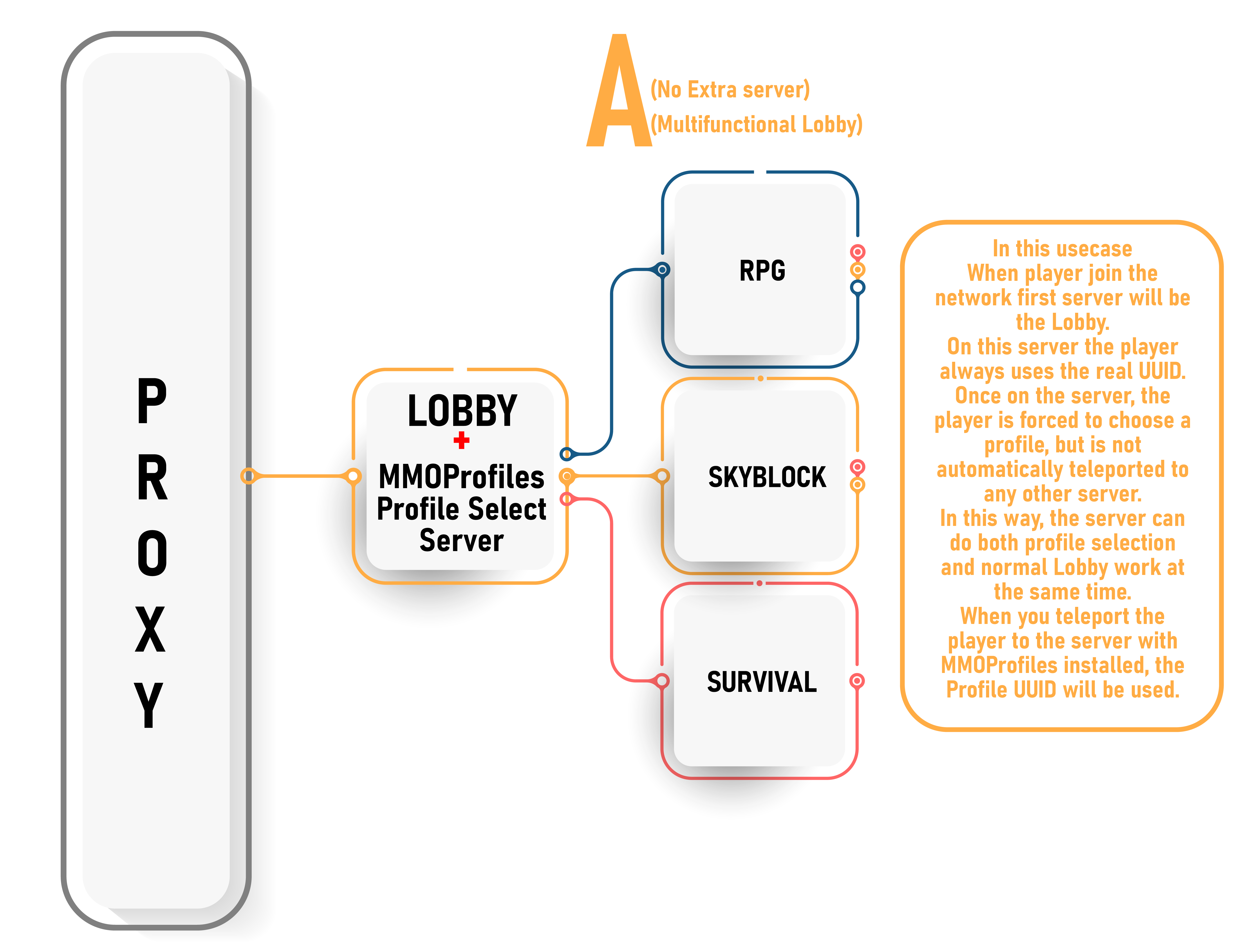
A) Multifunctional Lobby. With this installation, there is no need for an extra server. The server undertakes both the lobby and Profile selection work. In this setup, as in every lobby, it is the server owner's responsibility to set up the player teleportation system.
Lobby:
- Set target servers to
target_servers: [](Cancels the player from auto-teleporting after profile select) - Include lobby server ID in
unselect_profile_on_login(It forces the player to use real UUID every time they enter this server.)
All other servers:
- Include this server ID in
kick_if_no_profile(If the player is teleported to this server without selecting a profile due to an error, it will not allow entry.) - Do not include server ID in
unselect_profile_on_login. - Set target servers to your lobby in all other servers.
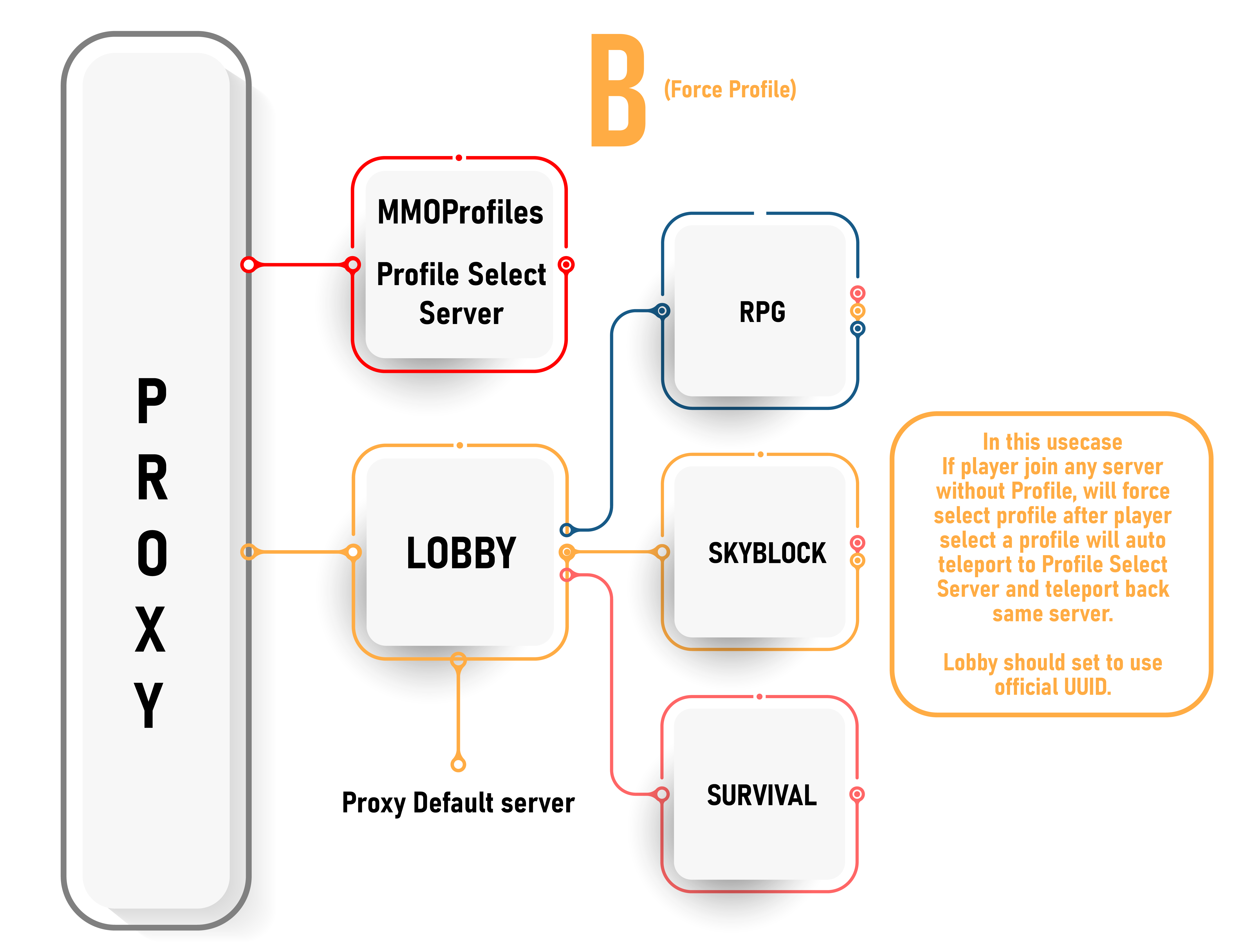
B) Force profile all or selected servers. back_to_initial_server set to true for every profile except lobby.
No need to install MMOProfiles on Profile Select Server.- To control Vault money and SharedPermissions in profiles, it is recommended to install MMOProfiles in the lobby and turn off forced profile selection.
no-gui-on-logintotrue
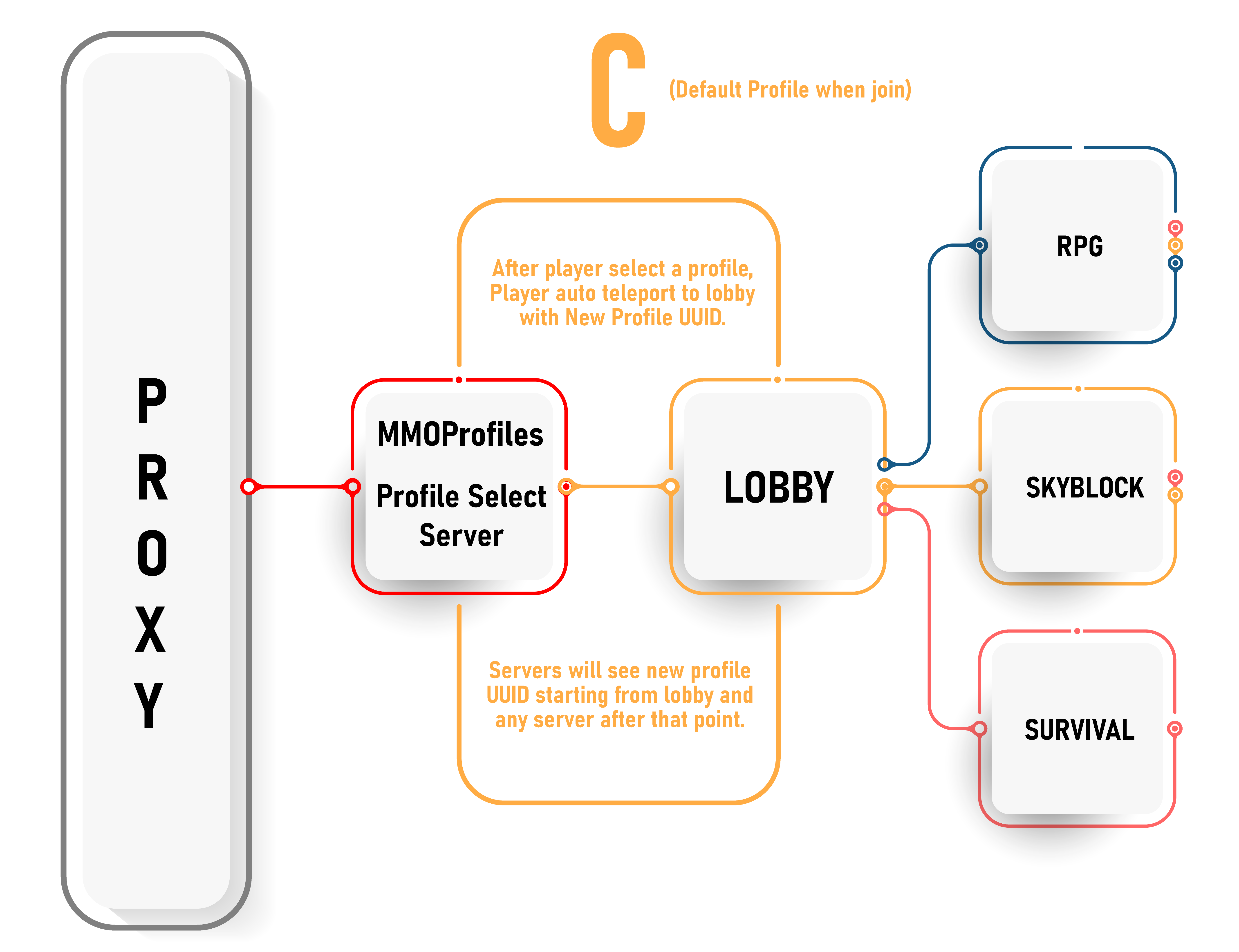
C) Forcing a profile on a particular server with profile selection before join.
back_to_initial_serverset totruefor every RPG servers.- No need to install MMOProfiles on other servers.
- To control Vault money and SharedPermissions in profiles, it is recommended to install MMOProfiles in the lobby and turn off forced profile selection.
no-gui-on-logintotrue
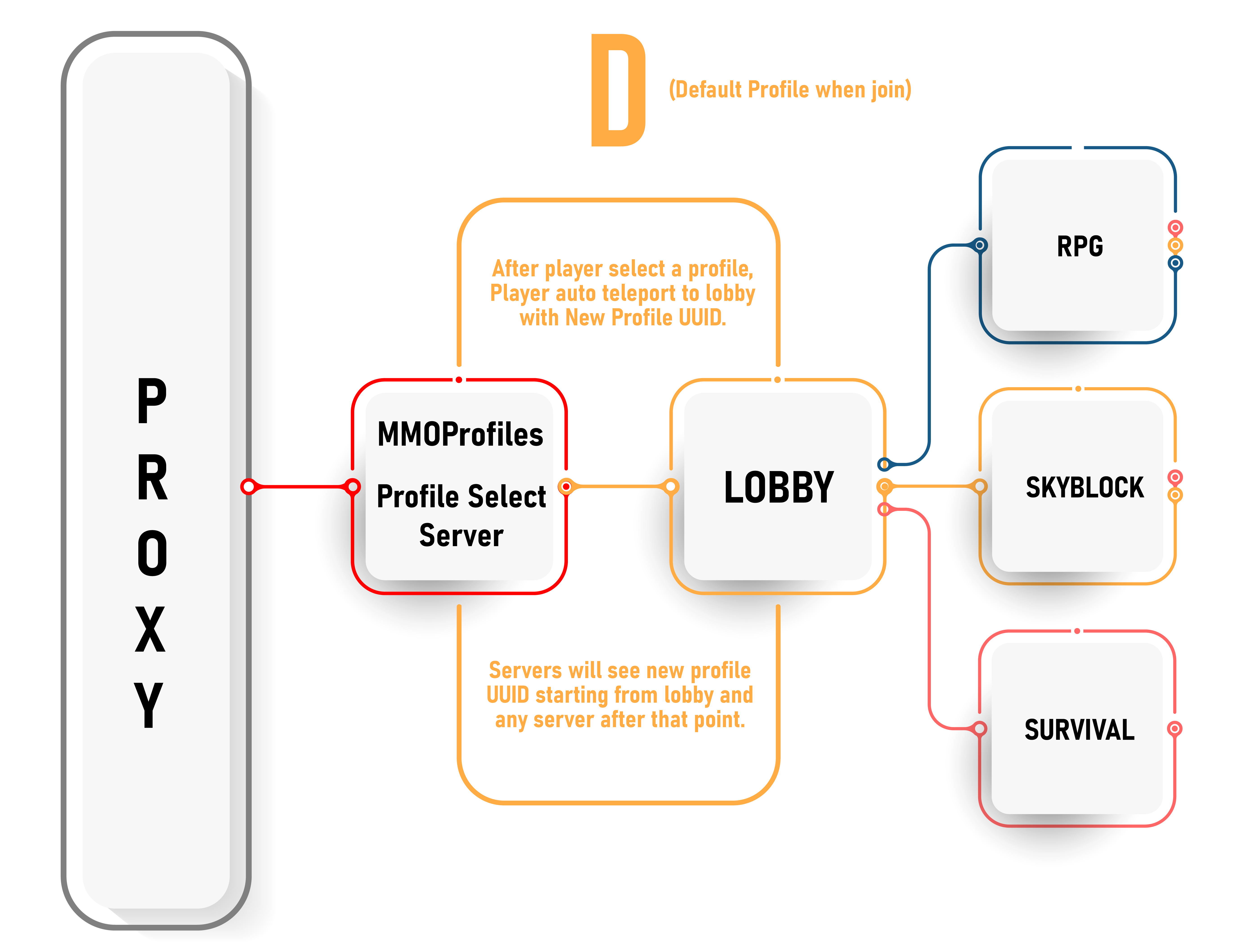
D) Forcing a profile on the whole network when player enter the server.
- Include server ID in
kick_if_no_profileto make sure players always have a profile. - It is mandatory to install MMOProfiles on all servers.