💎 Oraxen
This pages describes the built-in compatibility features between MMOInventory and Oraxen. Note that it does not mean that other item plugins are not supported, it just means that Oraxen has some exclusive features.
Custom Textures
MMOInventory 1.6.5 introduces native Oraxen support. Since MMOInventory requires the use of a custom resource pack, MMOInventory will detect Oraxen on startup and inject the required items into its registry. The only thing you MUST do is to place all of your item textures into one specific folder, that is Oraxen\pack\textures\items\mmoinventory. Your textures must be .PNG files, and the name must follow the lower_case_format. There must be a perfect ONE-TO-ONE matching between your slots.yml configuration and your Oraxen texture folder! If there is any error, Oraxen will probably output a texture error. Example with the default MMOInventory slots.yml config:
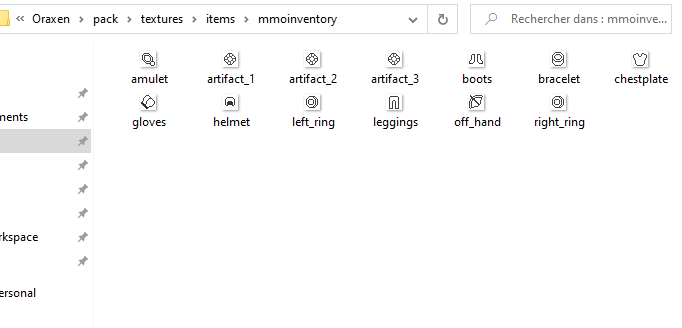
If you see a file named mmoinventory-hook.yml located in the Oraxen/items/ folder, do NOT touch it! It's generated automatically by MMOInventory and handles all the Oraxen compatibility stuff by registering the items in your resource pack.
Custom GUI Textures
Using Oraxen you can also setup glyphs which let you add a custom texture to your inventory. To use a glyph, remember you can use the PAPI placeholder %oraxen_<glyph_id>%. Also make sure you remove the filler item config section from the items.yml config section when using a custom GUI texture.
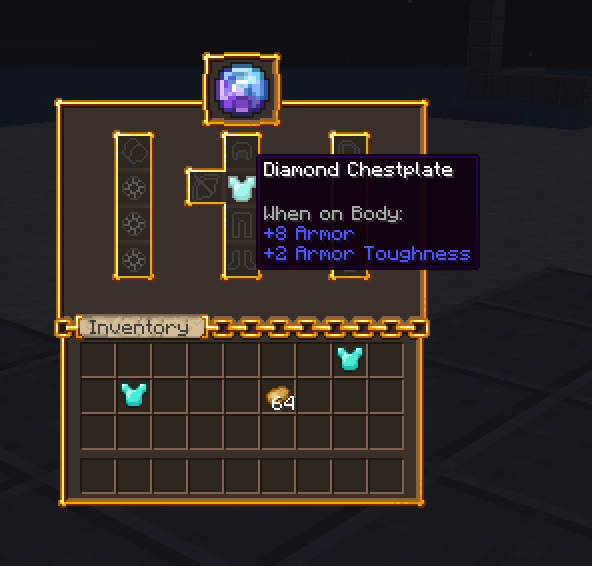
It's super easy to use Oraxen glyphs inside the inventory name. Head to the language.yml config file:
inventory-name:
    self: '&f%oraxen_shift_16%%oraxen_shift_2%%oraxen_mmoinv_default%'
If you have never heard about custom emojis/GUI textures/icons before but are hyped by the previous screenshot, you should definitely learn more about it. Oraxen basically automates the use of custom item/GUI/emoji textures.