🧙♂️ Classes
Due to popular demand, one of MMOCore's trademark features is its customizable class system! This paragraph goes over the important features of classes as well as how to configure them.
Our class system aims to provide a completely user determined class creation system that looks good and works well. We have picked up where other plugins have been abandoned!
Choosing a class
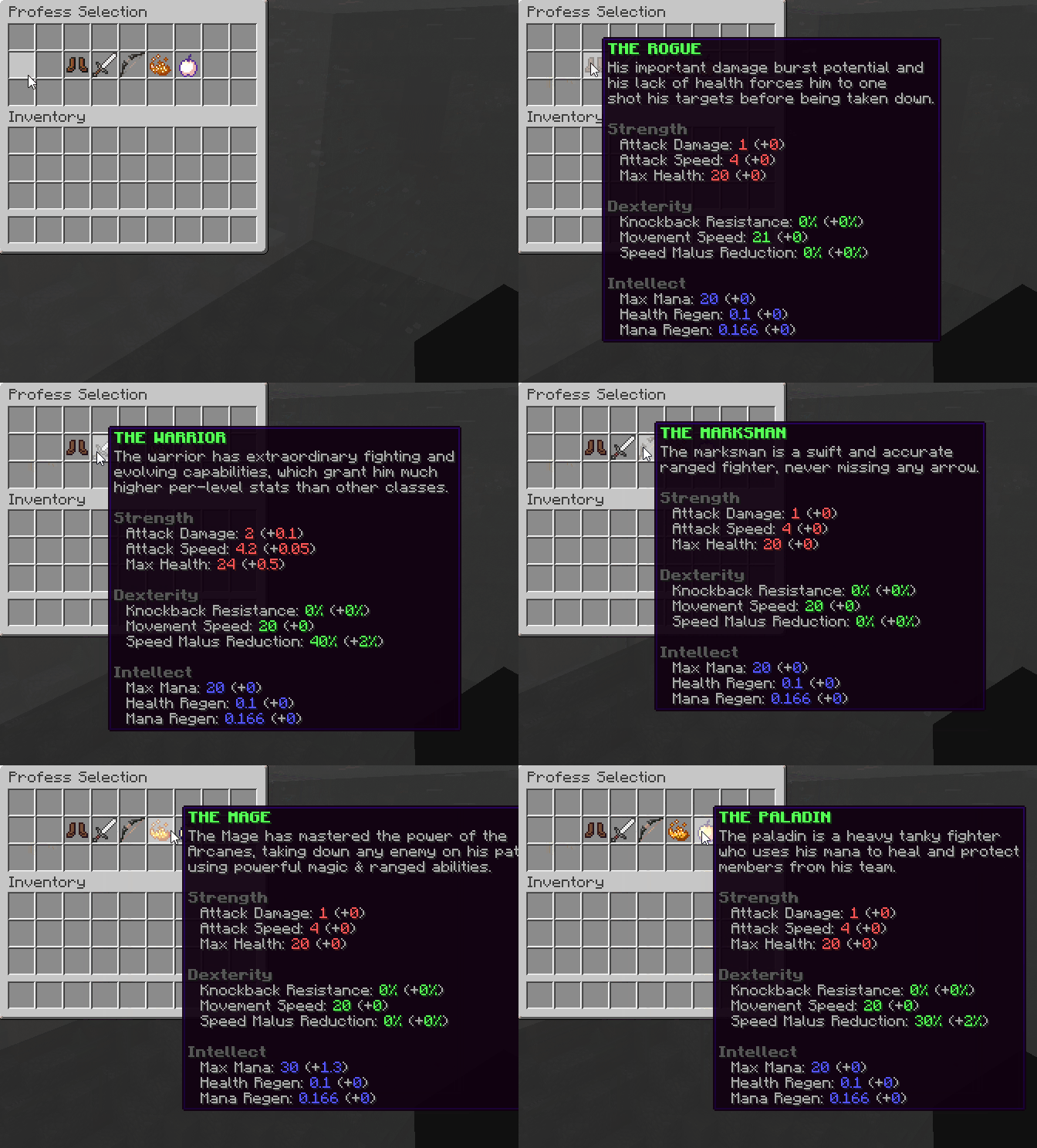
Use the /class command to open up the class selection menu.
Class Points
In order to pick a new class, or switch between classes, players need a skill point. You can get these via an admin command. With this versatile command, server admins can hand out class points however they want, either when leveling up or using a special item with a command bound onto it.
/mmocore admin class-points <player> 10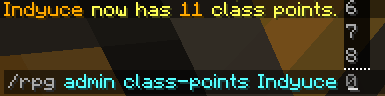
Default Class
When logging in for the first time, players start with the dummy Human class. They are able to gain experience and level up this class, but it should only be a temporary class as it has no skill and lower stats. As soon as they get their first class point, they should switch to another class! The default classes are Mage, Marksman, Paladin, Rogue and Warrior.
If you do not plan on using the MMOCore class system, you can remove all classes but the Human class. MMOCore needs at least one class. If there is only one class, players won't be able to switch classes.
Class Configuration Overview
Each class is divided into its own class config file. You may create as many classes as you want, and you may modify/remove the default classes, as long as there is at least one class. Creating new classes is as simple as copying the format from the default folders and giving it your own creative ideas.
TIP
In order to create a new class, copy and paste the Mage class config file. This is a simple class template which already has most of the features explicitly written in its config file. This will give you a decent base to start with.
The following sections will guide through class configuration - choose a class config file, open it and explore it along with the wiki.
Display Options
These are the first options you will see when opening class config files. These display options let you determine how your class looks in the class menu.
display:
  name: 'Mage'
  lore:
    - 'The Mage has mastered the power of the'
    - 'Arcanes, taking down any enemy on his path'
    - 'using powerful magic & ranged abilities.'
  attribute-lore:
    - '&a+ &7Mana Regeneration'
    - '&a+ &7Health Regeneration'
    - '&a+ &7Max Mana'
    - '&c- &7Max Health'
    - ''
    - '&8&lStrength'
    - '&7  Attack Damage: &c1 &7(+&c0&7)'
    - '&7  Attack Speed: &c4 &7(+&c0&7)'
    - '&7  Max Health: &c18 &7(+&c0&7)'
    - ''
    - '&8&lDexterity'
    - '&7  Knockback Resistance: &a0% &7(+&a0%&7)'
    - '&7  Movement Speed: &a20 &7(+&a0&7)'
    - '&7  Speed Malus Reduction: &a0% &7(+&a0%&7)'
    - ''
    - '&8&lIntellect'
    - '&7  Max Mana: &927 &7(+&91.2&7)'
    - '&7  Health Regen: &90.13 &7(+&90&7)'
    - '&7  Mana Regen: &90.2 &7(+&90.04&7)'
  item: BLAZE_POWDER:10 #10 is the custom model data
The name option corresponds to the class name, used in placeholders and info GUIs. The lore and attribute-lore options correspond to the class description displayed when a player selects his class using /class.
WARNING
Editing the class lore does NOT actually edit those attributes, it is visual-only!
The item option corresponds to the icon displayed in the same GUI. You may use custom model data to change the class icon using the following format:
display:
  ...

  # Format: <material>:<custom-model-data>
  item: 'BLAZE_POWDER:1'
The following syntax is also valid.
display:
  item:
    # More icon options
    item: BLAZE_POWDER
    custom-model-data: 10
    custom-model-data-string: 'whatever'
    item-model: 'minecraft:dirt'
    texture: 'base64skulltexture' # Requires 'item' to be 'PLAYER_HEAD'
Maximum Level
This option sets the maximum level reachable in this class. Once reached, players can no longer level up.
# Players cannot go higher than Lvl 100
max-level: 100
Experience Curve
Experiences curves define how much experience players in this class need in order to level up. Please read this wiki page to learn how to setup experience curves.
Every class has exactly one experience curve. In every class config, the exp-curve field must match the ID of an existing experience curve.
# Must match an existing exp curve filename from the 'exp-curves' folder
exp-curve: levels
Experience Tables
Experience tables define what happens when players level up their main class: do they get stats, obtain skill points, attribute points, skill tree points? Do they unlock new skills or new waypoints?
TIP
Experience curves decide when players level up, experience tables decide what happens.
Just like professions, classes have exactly one experience table. The field exp-table field must match the ID of an existing experience table. Please read this wiki page to learn how to setup experience tables.
# MMOCore/class/mage.yml

# The class exp table
exp-table: class_exp_table
Additional Options
These are very diverse yet important class options.
options:
  default: false
  display: true
  off-combat-health-regen: false
  off-combat-mana-regen: false
  off-combat-stamina-regen: false
off-combat-stellium-regen: false| Option | Description | Default |
|---|---|---|
| default | The class that a new player will spawn in with | false |
| display | Whether or not the class should display in /class | true |
| off-combat--regen | Resource regen only applies when out of combat | false |
| needs-permission | The class needs the permission mmocore.class.<class_id> to be unlocked | false |
Class Stats
Class stats are the statistics given to the player when they level up. It's one of the most essential features for RPG servers.
stats:
  max-health:
    base: 18
    per-level: 0
  max-mana:
    base: 27
    per-level: 1.2
  mana-regeneration:
    base: .2
    per-level: .04
  health-regeneration:
    base: 0.13
    per-level: 0
  ...
Every stat scales with the player's class level. Given the player's level, the stat formula is the following:
stat_value = base + player_level * per_levelINFO
When not specified in the class config, MMOCore fallbacks to the stat values provided in MMOCore/stats.yml, then MythicLib/stats.yml.
You may also add min/max bounds to balance stats that are too overpowered.
stats:
  max-health:
    base: 18
    per-level: 3
    max: 80 # Cannot go above 80 max health
    min: 20 # Cannot go under 20 max health
You can also use complex math formulas, instead of the linear formula presented above, using the following syntax. This supports PlaceholderAPI as well as the {level} placeholder.
stats:
  max-health: 'min(100, 19 + {level} * {level})'
The following syntax is also valid.
stats:
  max-health:
    formula: 'min(100, 19 + {level} * {level})'
    papi: false # Disable PAPI placeholder checks
    failsafe: 20 # In case the formula goes wrong, fallback to 20
Mana Display Options
Every class can have a different mana bar (mana for mages, rage for warriors...). The char option corresponds to the character which will be used to display the player's mana bar inside a chat message. The color config section corresponds to the color being used to generate that bar. The icon option corresponds to the mana icon displayed on the player action bar.
mana:
  char: '♦'
  icon: '&c♦'
  color:
    full: DARK_RED
    half: RED
    empty: WHITE
  name: 'Rage'
Subclasses
Subclasses are classes which are available only when players reach a certain level. This is a way to make your class architecture more diverse by adding multiple new paths and playstyles.
subclasses:
  ARCANE_MAGE: 10
Simply give the class ID and the level at which the subclass should be unlocked. When a player has a subclass available, a slightly different menu will pop up when using /classes. Nothing else differs for a subclass. Display, attributes, skills, etc are all setup the same. That obviously means you will need to create a separate config file for your subclass and put its reference in that subclasses section.
Since you most likely want your players to access these subclasses only by leveling previous (sub)classes, you will most likely use the display: false class option (see above) so that your subclass does not display in the class list when using /classes.
Skills
Each class has its own set of skills. Learn more about class skills on this wiki page.
Skill Slots
Each class has its own set of skill slots. Learn more about skill slots on this wiki page.
Linking a skill tree to a class
Skill trees are class-based, which means that the skill trees that you have access to depend on your class. You can link skill trees to a class using the following syntax:
# Skill trees of the Mage class
skill-trees:
  - 'general'
  - 'mage-arcane-mage'
Casting Mode Particles
This option determines the particles displayed when the player is in casting mode. At the moment, the particle effect pattern cannot be edited (elegant particle helix rotating around the player): you can only change the particle used to draw that helix.
cast-particle:
  particle: SPELL_INSTANT
Some particles require a color to be displayed, like the Redstone particle which is named DUST in Minecraft 1.21. The following format will let you modify the particle color.
cast-particle:
  particle: REDSTONE
  color:
    red: 255
    green: 100
    blue: 0
Some particles require you to provide a block, which you can do using the following format. Some examples include BLOCK, FALLING_DUST and DUST_PILLAR in 1.21.
cast-particle:
  particle: BLOCK_BREAK
  material: DIRT
TIP
You can disable casting mode particles by deleting or commenting out the cast-particle section.
Class Scripts
You can define scripts which will apply to players with the corresponding class. These scripts can be used to code complex custom skill behaviours, class passive skills, or literally anything.
Just like skills, class scripts have a trigger associated with them, determining when this script will activate. You can find the list of all available trigger types on this wiki page. You can also learn how to write MMOLib custom scripts on this wiki page.
Here is an example of a script for the Warrior class, that converts 10% of physical damage dealt into Rage points, up to a maximum of 10 Rage pts simultaneously.
scripts:
  ATTACK:
    conditions:
      - 'has_damage_type{types=PHYSICAL}'
    mechanics:
     - 'mana{amount="min(10, 0.1 * <attack.damage>)"}'
  DAMAGED: {...}
The following format also works, as long as the script named some_script_id has already been defined somewhere else.
scripts:
  ATTACK: some_script_id
Disabling MMOCore classes
In some cases you might want to fully disable classes and/or leveling within MMOCore. This is rather simple to do:
- Delete the content of the
/classfolder (do not delete the whole folder, as it will regenerate). This has the effect of disabling classes and leveling all together. - Inside the
commands.ymlconfig file, remove the/classand/skillscommand. - Edit the
/gui/player-stats.ymlUI so that it does not display class information anymore.
If you would like to keep classes but disable leveling, remove all references to exp tables from within the /class and/or /profession folders. Classes and/or professions will be stuck to level 1. Don't forget to also edit the /gui/player-stats.yml UI so that it does not display information about leveling anymore.