📖 Quests
Quests are an essential part of any RPG. They give players goals, challenges, and rewards, while guiding them through the world. MMOCore includes a basic quest module, but it’s not as complete as popular Spigot quest plugins.
For more complex RPG servers, we recommend sticking to popular, maintained quest plugins that are fully supported by MMOCore:
- TypeWriter recommended
- BetonQuest recommended
- BeautyQuests
- Quests
- QuestCreator
Choosing your quest plugin
Go to MMOCore/config.yml and set quest-plugin to whatever plugin you want to use. Make sure you restart your server when editing this option.
# Edit the plugin handling quests here.
# Supported values (just copy and paste):
# - MMOCORE (Default, built-in quest system)
# - NONE (Used to fully disable quests)
# - BEAUTYQUESTS
# - QUESTCREATOR (https://www.spigotmc.org/resources/questcreator.38734/)
# - QUESTS (https://www.spigotmc.org/resources/quests.3711/)
quest-plugin: MMOCORE
Using any quest plugin that is not MMOCore will disable all quest features from MMOCore, including the quest registry and the /quests command. You will not get any warning for any MMOCore quest config error.
MMOCore Quests
MMOCore provides a simple objective-based quest solution, though it does not provide complex branching storylines with conditional events, tags and variables, like what you can achieve with BetonQuest or Typewriter.
INFO
The following paragraphs describe the built-in MMOCore quest module.
MMOCore quests are series of objectives the players must complete in order to earn some loot and experience. There are various types of objectives, like going to a specific location, talking to an NPC, killing X mobs, bringing items back to an NPC... Some of these objectives require extra plugins like Citizens for NPC objectives or MythicMobs for extra mob objectives.
Parent Quests
Quests may require that the player has completed some other quest beforehand, therefore you can set up some sort of storyline.
Quests have a specific set of actions (these are called triggers), like messages or commands, performed when the player completes an objective. These may be used to explain specific things to the player, or to give them quest items or rewards.
Progression
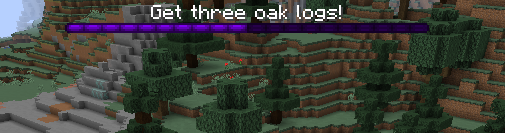
Whenever a player starts a quest, they can keep track of that quest progression in the quest GUI and on the bossbar, which displays the current quest objective. The bossbar also displays how close the player is from finishing the quest (ratio of completed objectives).
Quest Menu
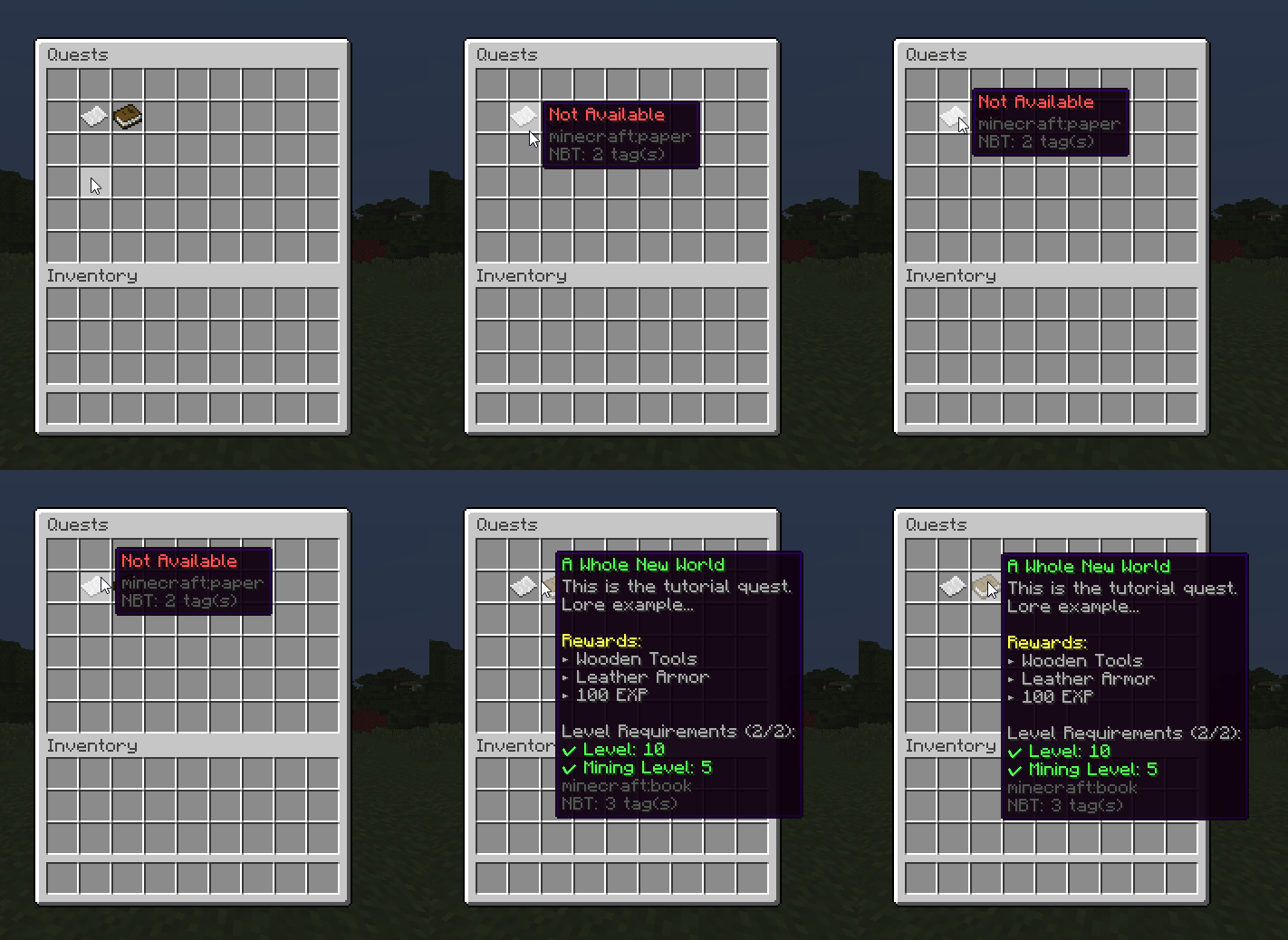
Players can see available and unlocked quests in the quest menu, which they can access using /quests.
Quest Example
The following sections explain how to set up a new quest, using an example from the default MMOCore config files.
# Levels players must have in
# order to unlock this quest.
level-req:
    main: 10
    mining: 5

# Quest name displayed in the quest menu.
name: 'A Whole New World'

# Quest lore displayed in the quest menu.
lore:
- 'This is the tutorial quest.'
- 'Lore example...'
- ''
- '&eRewards:'
- '&7► Wooden Tools'
- '&7► Leather Armor'
- '&7► 100 EXP'

# Quests the player must finish
# in order to unlock this one.
parent: []

# Cooldown in hours. Don't put any
# to make the quest a one-time quest.
# Put it to 0 to make it instantly redoable.
delay: 12

# Objectives the player needs to
# complete. Once they're all complete,
# the quest will end.
objectives:
    1:
        type: 'clickon{world="world";x=56;y=68;z=115;range=5}'
        lore: 'Head to the camp.'
        bar-color: PURPLE
        triggers:
        - 'message{format="&aGood job, now get some oak logs!"}'
        - 'sound{sound=ENTITY_EXPERIENCE_ORB_PICKUP}'
    2:
        type: 'mineblock{type="OAK_LOG";amount=3}'
        lore: 'Get three oak logs!'
        triggers:
        - 'message{format="&aGood job, now give these logs to the blacksmith."}'
        - 'sound{sound="ENTITY_EXPERIENCE_ORB_PICKUP"}'
    3:
        type: 'getitem{type="OAK_LOG";amount=3;npc=0}'
        lore: 'Give these oak logs to the blacksmith.'
        triggers:
        - 'message{format="&aGood job, now talk to the blacksmith again to claim your weapons!"}'
        - 'sound{sound=ENTITY_EXPERIENCE_ORB_PICKUP}'
    4:
        type: 'talkto{npc=0}'
        lore: 'Get your weapons from the blacksmith!'
        triggers:
        - 'message{format="&aNow go kill 5 skeletal knights to finish tutorial!"}'
        - 'sound{sound=ENTITY_PLAYER_LEVELUP}'
    5:
        type: 'killmythicmob{name="SkeletalKnight";amount=5}'
        lore: 'Kill 5 skeletal knights!'
        triggers:
        - 'message{format="&a&lYou have successfully finished the tutorial!"}'
        - 'sound{sound="ENTITY_PLAYER_LEVELUP"}'
        - 'mmoitem{type=SWORD;id=CUTLASS}'
Config Breakdown
The config above is one of the YAML files you can set up in the quests folder (one YAML config per quest). The first config option is level-req feature. This determines what level the player needs to be in order to unlock the quest. Our default config sets it to level 10 main, and level 5 mining profession.
After that, you can set the name of the quest that is displayed in the quest menu. The initial name that you set earlier is just for ID purposes in the config.
Next, you can set the lore of the quest that is displayed in the quest menu. Note that adding rewards here won’t actually grant them; it’s just for display.
Next option is the parent option, this determines if there is another quest the player must finish in order to unlock the specific quest.
Next option is the cooldown on the quest. If you want it to be a one-time quest, you put nothing in the option. If you want it to be instantly redoable, set it to 0. Otherwise, the cooldown is in hours.
Objectives
Next, the quest file lets you put in the objectives. A quest is a series of objectives a player must complete in order to earn some rewards. Inside of an objective you have the type, lore, and triggers.
Type is what determines what the player must do, Lore defines what the quest tells the player to do, and triggers determine what happens when the player completes the actual objective.
Since the objective lore is displayed on a bossbar, you can change the color of the bar for every objective using bar-color: <COLOR>. A list of all the available colors can be found over the Spigot javadocs.
Triggers can be either used to give information to the player about the RPG storyline or instructions for the next objective, or simply quest rewards.
| Objective | Description | Format |
|---|---|---|
| clickon | Player must click somewhere in the map. | clickon{world=<world-name>;x=<x>;y=<y>;z=<z>;range=<radius>} |
| mineblock | Player has to mine X blocks of the same type. | mineblock{type=<MATERIAL>;amount=<amount>} |
| killmob | Player must kill X vanilla mobs. | killmob{type=<ENTITY_TYPE>;amount=<AMOUNT>} |
| goto | Player has to go to some location. | goto{world=<world-name>;x=<x>;y=<y>;z=<z>;range=<radius>} |
| getitem | Player has to give a Citizen NPC an item. | getitem{type=<MATERIAL>;npc=<Citizen_ID>;amount=<AMOUNT>} |
| getmmoitem | Player has to give a Citizen NPC an item from MMOItems. | getmmoitem{type=<MI_TYPE>;id=<MI_ID>;npc=<Citizen-ID>;amount=<AMOUNT>} |
| talkto | Player must talk to an NPC. | talkto{npc=<Citizen_ID>} |
| killmythicmob | Player has to kill X mythic mobs. | killmythicmob{name=<mythicMobsInternalName>;amount=<AMOUNT>} |
Trigger Types
A full list of available triggers to be used in conjunction with these objectives can be found here.