⚔️ Combat
Combat Logging
Combat logging is a useful feature that lets players know when they enter or quit combat. Combat log is handled via chat messages. It is a very simple feature in itself, but it ties in so nicely with other mechanics like skills.
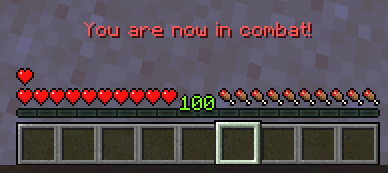
For instance, there is a built-in MMOCore skill that makes players deal increased melee damage when entering combat. Using the %mmocore_since_enter_combat% placeholder, you could also imagine a skill that increases damage dealt based on how long the player has been in combat.
Resource Regeneration
Combat log also dictates when the player should be able to regen their resources (health, mana and stamina).
For instance, you can set up a Warrior class with a base flat health regeneration rate, and with an additional 10% missing health regeneration per second when out of combat. This can be applied to any class, any resource, the off combat option can be disabled, the % can scale on the player's level, and you can make it so the regenerated amount also scales on the player's missing health instead.
Placeholders
MMOCore features multiple PlaceholderAPI placeholders that you can use to check if a player is in combat, in PvP Mode, the time since last hit, combat time so far...
Friendly Fire
Everyone knows the concept of friendly fire: the ability to accidentally or intentionally harm allies with attacks. In MMOCore, this concept is extended to all player interactions, not just damaging skills.
These rules are referred to as "interaction rules". They define when and how a player can "interact" with another player, whether through a skill or a weapon attack. For example, you might want to prevent players from using damaging skills on members of the same guild, faction, or party, while still allowing them to cast healing or buffing skills on each other. Simply disabling all skills would not work, since support skills are also essential.
TIP
In short, interaction rules in MMOCore define Friendly Fire for any skill or attack, for offense or support.
Configuration
Let's observe the following config syntax snippet, which you will find at the bottom of MythicLib/config.yml.
interaction_rules:

  # When enabled, apply PvP interaction rules for skills, melee attacks,
  # projectile hits, MythicMobs mob/skill damage.....
  # This option is voluntarily disabled by default to reduce confusion.
  enabled: true

  # When disabled, support-based skills (buffs or heals)
  # may only be applied onto players.
  support_skills_on_mobs: true

  # Interaction rules
  #
  # {world_pvp} returns true if PvP is enabled world-wide, either using
  # the 1.21.9+ gamerule or server setting on older versions
  # {flag_pvp} returns true if the WorldGuard/Residence Pvp flag is
  # allowed. You can write custom formulas and use !, && or ||
  rules:

    # Ability to heal self/other players
    support:
      self: true

      party_member: true
      guild_ally: true
      guild_enemy: '!{world_pvp}'

      party_other: '!{world_pvp}'
      guild_neutral: true

    # Friendly fire for guilds/parties
    offense:
      self: false

      party_member: false
      guild_ally: false
      guild_enemy: '{world_pvp}'

      guild_neutral: true
      party_other: true
Set enabled to true to enable PvE/PvP interaction checks. The most important config sections are rules.offense and rules.support. Here are some examples:
- Setting
offense.party_membertofalsedisables friendly fire for players within the same party - Setting
offense.guild_enemytotrueallows players from enemy guilds to fight each other. This option should be left totrue, as it makes no sense to disable PvP in between enemy guilds. - Setting
offense.selftofalseprevents the player from casting damaging skills onto himself.
Note that MythicLib takes into account the first/topmost rule that applies to the player. In other words, rules that appear first in the configuration are of higher priority. Let's look at an example to understand this priority feature:
- You have both a guild and party plugin installed.
- Player A is in guild A and has no party.
- Player B is in guild B and has no party.
Player tries to deal damage to player B. The guild plugin will flag players with relation guild_ally as they are in the same guild. The party plugin will flag them with relation party_other because the two players are not in the same party. In the config above, guild_ally appears first, in front of party_other, so guild_ally takes precedence: the result is false and player A is not allowed to damage player B.
Placeholders
Instead of using true or false, you can also use placeholders. PAPI placeholders are supported, and will parse against the player performing the initial interaction (either the player dealing damage to their target, or the player trying to cast the support skill). {flag_pvp} returns true if WorldGuard allows PvP. {world_pvp} returns true if world PvP is enabled
INFO
World PvP is defined by the pvp gamerule in 1.21.9+. In older versions of Bukkit, it is a server wide option under settings.yml.
PvE
These rules only apply to PvP. By default, MythicLib does not prevent the use of offense skills against mobs.
The support_skills_on_mobs option determines if players are allowed to cast support skills/heals/buffs onto monsters.
Supported Plugins
To apply these friendly fire checks, MythicLib needs to communicate with your guild/party plugin. The list of supported party plugins can be found here. The list of supported guilds, factions, clans, kingdoms... plugins can be found here.
Where do these rules apply?
These rules apply to:
- all PvP/PvE melee attacks,
- damage dealt by vanilla projectiles,
- all skill damage dealt by MythicMobs custom skills,
- damage or buffs inflicted by built-in MythicLib skills...
Inside MythicMobs Skills
You can check if a player can interact with a given entity, from inside a MythicMob custom skill, using the mmoCanTarget condition. Please refer to this wiki page for more information.
This condition has a very interesting side effect. Without this condition, offensive projectiles stop on the target entity, even if this entity cannot be damaged. The damage mechanic calls a Bukkit damage event, which MMOCore then cancels as it notices that the two players are in the same party/guild...
Then, no damage is dealt, but MythicMobs still kills the projectile. Had the mmoCanTarget condition been used, the skill would have checked ahead of time that the entity was damageable, and the entity would have been ignored by the projectile.
PvP Mode
This feature is specially designed for PvE-focused servers which still want to leave some options for players to fight. In specific WorldGuard regions where PvP is disabled by default, players can use /pvpmode to toggle on PvP back and fight other players! Only players with PvP enabled can fight and attack each other. Furthermore, this feature is fully compatible with the PvP interaction rules defined above.
This works well for RPG or even profession/job-oriented survival servers.
WARNING
PvP Mode only works with WorldGuard! It won't work with other flag plugins like Residence.
How to setup PvP Mode
- first setup PvP interaction rules as explained above
- select an existing/create a new WorldGuard region
- toggle ON server PvP, world PvP as well as the PvP flag
- toggle on the
pvp-modeWorldGuard flag. It is toggled off by default
You are now good to go! When the pvp-mode flag is on, players have access to the /pvpmode command and MMOCore will take care of the rest.
Configuration
In order to prevent abuse, you can configure PvP Mode so that players can't exit it while they are still in combat. Moreover, you can setup cooldowns for that command.
The following code snippet is located in the MMOCore config config.yml.
pvp_mode:

  # Requires /reload when changed
  enabled: false

  # Minimum level in order to fight other players.
  # Set to 0 to fully disable
  min_level: 0

  # Maximum level difference in order to fight other players.
  # Set to 0 to fully disable
  max_level_difference: 10

  # Delay after any attack during which the player will stay in PvP Mode (seconds)
  # Has to be lower than 'cooldown.combat'
  combat_timeout: 30

  # Invulnerability triggered when:
  # - entering a PvP region with PvP Mode turned on.
  # - using the /pvpmode command inside of a PvP region.
  invulnerability:
    time:
      region_change: 60
      command: 30

    # When enabled, players can damage other players
    # to end this invulnerable time period.
    can_damage: false

    # When enabled, leaving a no-PVP zone and entering a
    # PVP zone will apply the SAME invulnerability time.
    # Requires /reload when changed
    apply_to_pvp_flag: true

  cooldown:

    # Cooldown before being able to use the /pvpmode
    # command when entering a PvP Mode region.
    region_enter: 20

    # Cooldown before being able to use the /pvpmode
    # command when entering a PvP Mode region.
    region_leave: 20

    # Delay before being able to use /pvpmode after being in combat (seconds).
    # Has to be greater than the 'combat_timeout'
    combat: 45

    # Cooldown when toggling on PvP Mode, before being able to toggle it off (seconds)
    toggle_on: 5

    # Cooldown when toggling off PvP Mode (seconds)
    toggle_off: 3
Disabling PvP Mode
In order to disable PvP Mode:
- remove the
pvp-modeconfig section fromcommands.yml - set
pvp_mode.enabledtofalseinsideMMOCore/config.yml