Item Stats
The edition menu (/mi edit) lets you know what stats you can add to an item and how to configure them. While most are self explanatory, here are some specifications about the most complex item options. This list does not contain every item stat or option you can find in MMOItems, but make sure to read the rest of the wiki, as it contains information about other item options. Item examples will help you creating items manually if you don't feel like using the edition menu.
TIP
Use CTRL+F to look for an item stat.
Numerical Stats
Numerical stats represent 80% of the stats available on items. They are stats which are defined by a single number: attack damage, attack speed, crit chance... Please refer to this wiki page.
Material, Durability
Your item material and its durability/data. Example: INK_SACK with 1 durability corresponds to Rose Red (for 1.8 - 1.12). Use ROSE_RED for 1.13. All materials can be found in the Spigot Javadocs. Be careful, these material names correspond to the latest Spigot version, it is therefore not 100% compatible with <1.14, and especially Legacy.
Display Name
The item display name. Use '&' for color codes. Hex color codes following the MiniMessage format are fully supported (ex: <#FFFFFF> or <HEXFFFFFF>). When an item is being generated, name prefixes/suffixes from modifiers are added to the base item name.
TEST_ITEM:
  base:
    name: '&fSteel Sword'
Placeholders are available for the item display name. For more information, please refer to this wiki page.
Custom Lore
Just to make it clear, items do have a lore even when not using this option. This option only adds a few custom lines at the end of the item lore. You can use it to have a small RPG type description of your weapon.
You can also use this option to display the item abilities. Because the way abilities are displayed by default is not really configurable, we have added lore placeholders for ability modifiers so that you can use this option instead. For instance, using {ability_fireball_damage} will return the Fireball ability damage.
The general format is {ability_<ability-_name>_<modifier_name>}. These placeholders do update if the ability modifier somehow changes, because of another plugin for instance.
Dye Color
This parameter is only for leather armor pieces. In RGB (red-green-blue)
TEST_ITEM:
  base:
    material: LEATHER_CHESTPLATE
    dye-color: 100 100 100
Enchantments
An enchantment is defined by an enchant type and a level. Use this format:
enchants:
  efficiency:
    base: 1
    # There is no Efficiency 1.3, but that means that every
    # 10 levels, the item will have an extra efficiency
    # enchant level! Stats like this are rounded to the nearest integer.
    scale: .1
  # That format still works because an enchant level is a numeric value
  sharpness: 10
Item Permissions
A list of permissions any player must have in order to use this item. You may use the corresponding bypass permission to bypass that item restriction.
Attack Damage, Attack Speed
The amount of damage your weapon deals, and at which speed (in hits/sec). These stats are based on the vanilla attribute modifiers.
These stats have a behaviour specific to them when weilding two items at the same time. While items including accessories such as off hand catalysts can increase your attack speed and damage when held in off hand, holding a weapon in off hand will NOT increase your attack speed and damage because these two stats are linked to the off hand weapon, which you are not using as your main weapon.
Critical Strike Chance & Power
The chance of your item, in %, of dealing a critical strike. Critical strikes deals 250% of the initial damage (configurable amount in the MythicLib config file). Critical Strike Power corresponds to the percentage of the initial damage a critical strike deals.
Since the MythicLib update, MMOCore skills and MMOItems item abilities can also deal critical strikes and all the crit options can be edited in the MythicLib main config file.
Range
The range of your whip/staff. The default value is 18. Units here are not exactly blocks, multiply this value by approx. 2.5 to get the value in blocks.
Blunt Power & Rating
Blunt Power corresponds to the radius of a blunt attack. The bigger the more enemies you can hit at the same time. Blunt Rating corresponds to the damage dealt by the blunt attack. In % of the initial damage. Example: Blunt Power = 3 | Blunt Rating = 70% | When hitting an entity, enemies within 3 units of distance will take 70% of the initial damage.
BLUNT_ITEM:
  base:
    material: IRON_HAMMER
    blunt-power: 3
    blunt-rating: 70
Unbreakable
When set to true, weapons never break. This option is needed if you planned to give your item a custom texture using the texture by durability mechanism.
Unstackable
When set to true, your item will never stack with itself.
Armor, Armor Toughness
The amount of armor and armor toughness your piece of armor gives to the player. These stats correspond to vanilla minecraft player attributes. Armor and armor toughness reduce damage taken. You may visit the official MC wiki to know how damage is calculated depending on armor & armor toughness, but briefly: armor reduces damage, and armor toughness reduces armor reduction. These stats are not supported in 1.8 since the corresponding Minecraft attributes were added back in 1.9.
Defense
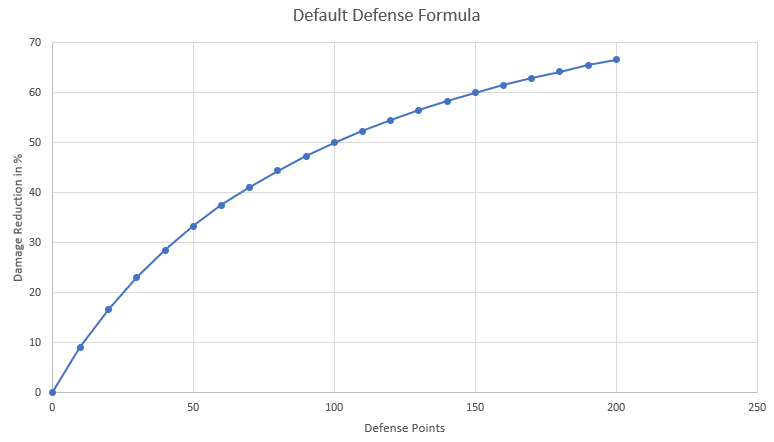
This stat determines the player's defense value and can be any positive number. Any item type can be given this stat. The formula for which defense damage mitigation is handled can be edited in the mmolib config.yml.
In case you are curious about the default defense formula, here is a graph showing the damage reduction in percentage as a function of the defense points:
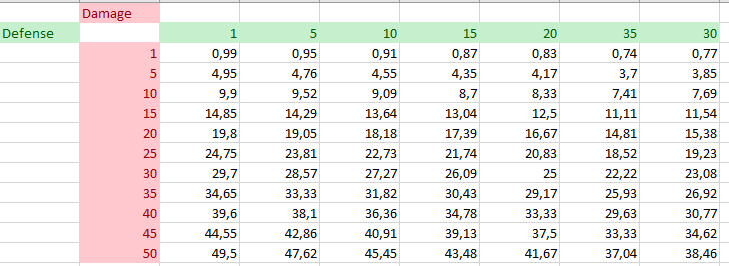
Here's now a table showing the amount of damage taken for a specific amount of incoming damage, and defense points:
Movement Speed
The amount of movement speed your item gives to the holder/wearer. The default minecraft movement speed is 0.2. If you set the item additional movement speed to 0.02, that will be +10% Movement Speed.
Two Handed
If a player holds two items at the same time, one being Two Handed, he's significantly slowed down. Using a specific config option you can make players unable to use any item when holding two heavy items.
Permanent Potion Effects
It's literally the same format as with the consumable potion effects (see above), but since these potion effects are supposed to be applied as long as the player holds the item, you do not have to specify the effect duration. The level config section is also gone because it's cleaner without it.
perm-effects:
  speed:
    base: 1
    scale: 1
  # That format works too
  haste: 3
Item Cooldown
The delay players must wait before EITHER using a consumable, or running all the commands from an item. In MMOItems Legacy, commands can all have different cooldowns and consumable have an option called Consume Cooldown which is similar to Item Cooldown.
Tool Options
Autosmelt: When toggled on, your tool automaticaly smelt mined iron and gold ores. Bouncing Crack: When toggled on, your tool mines extra blocks behind the initial one.
Item Elemental Stats
element:
  fire:
    defense:
      base: 10
      scale: 3
    # That format still works!
    damage: 10
  water:
    defense: 50
Item Commands
The list of commands your item performs when right clicking it. Commands may have a cooldown and a delay, after which it is automatically cast. You can use this option to create e.g consumables which teleport you back home using the /spawn command. Warning: the command cooldown differs from the consumable cooldown, therefore you need to make sure they are the same, otherwise the consumable may be consumed without casting the commands. You can install PAPI Player extension (/papi ecloud download Player) and use the %player_name% placeholder to get the command sender name.
TEST_ITEM:
  base:
    material: PAPER
    name: '&rScroll of Cowardness'
    commands:
      '1':
        command: spawn
        cooldown: 10
        delay: 1
Arrow Particles
This option can be used to display particles around arrows fired by your bow. Particles can be fully configured (type, speed, color).
MARKING_BOW:
  base:
    material: BOW
    arrow-particles:
      particle: SMOKE_NORMAL
      amount: 3
      speed: 0.05
Equip Priority
Assign a priority to an Armor Piece, then when you right click with an mmoitems armor in your hand, if the equip priority on that item is higher than or equal to the equip priority on the currently equipped armor, it will hot swap the armors for you.
DIAMOND_CHESTPLATE:
  base:
    material: DIAMOND_CHESTPLATE
    tier: COMMON
    unbreakable: true
    equip-priority: 4.0
This can be completely disabled or enabled in the Config.yml by editing: auto-equip-feature: false
Required Level
The level your weapon/item requires in order to be used. This restriction completely supports RPG core plugin levels.
Required Profession Level
This stat determines if a player can use the item or not depending on the required profession level. Requires MMOCore.
Skull Texture (for player heads only)
The skull texture used for a custom head. For 1.13, use the PLAYER_HEAD material to get a player head item. Legacy users must use SKULL_ITEM with a durability of 3. The config format for that stat is rather weird because of a specific issue with custom textured skulls.
SKULL_ITEM:
  base:
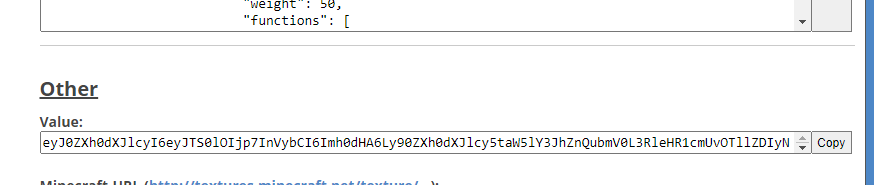
    skull-texture: 'eyJ0ZXh0dXJlcyI6eyJTS0lOIjp7InVybCI6Imh0dHA6Ly90ZXh0dXJlcy5taW5lY3JhZnQubmV0L3RleHR1cmUvOTdlMmY0OTQyNDNhY2FkM2Y0ODQ0YmM1YWUyZDVmZDUzZTY5MjczMzA0YzlkYmY1YmQxMzA5NDlmYTEzMjk4ZiJ9fX0='
You can find skull texture values on Minecraft Heads or similar head databases. For example, navigate to the bottom of this page to find the skull value which looks something like this:
Gem Sockets
Having gem sockets on your item allows you to place gem stones onto it. Gem stones improve your item stats. Each bound gem stone occupies one gem socket. More info on this wiki page.
Disable Interactions
When enabled, this option will disable any event that could happen when right-clicking/placing your item. It blocks block placement and item use (snowballs, cocoa seeds, saplings.........).
Inedible & Disable Right Click Consume
Inedible completely disables the right-click item event.
Disable Right Click Consume only prevents your item from being consumed when right clicked. You can still eat it but it won't be consumed.
Item Particles
Displays some particles when holding/wearing your item. An item particle effect is defined by 3 things: the particle pattern and its pattern modifiers, and the actual particle being used in the effect.
The particle pattern defines how the particle will behave, what shape it forms, etc. For instance, choosing the Helix particle pattern will make the particle form a circle going up & down around you.
The particle is the actual particle that is being used in the particle effect. For example, Choosing redstone with Helix will form a helix of redstone particles around you. You can see a list of available particles here, but note that a few of them will not work with MMOItems.
You can then slightly tweak the particle effects by changing the particle modifiers which can, for instance, change the base y-offset for the helix, its radius, its height, its display speed...
Some particles are colorable e.g the redstone particle. This means you can edit their color to make particle effects even more unique. Colors can be setup by inputing three color levels: red, green and blue (RGB).
FIRE_GREATLANCE:
  base:
    material: BLAZE_ROD
    # this displays two flame rings that slowly swirl around the player
    item-particles:
      type: DOUBLE_RINGS
      particle: FLAME
      radius: 1.3
      rotation-speed: 0.4
Here is the list of the available particle types: OFFSET, FIREFLIES, VORTEX, GALAXY, DOUBLE_RINGS, HELIX, AURA.
Musket Stats
There are two main item stats you can use to customize muskets. Muskets are special range weapons that fire bullets when right-clicked. The knockback item stat defines the knockback applied onto the player whenever he fires a musket. It thus must be a positive value. The recoil defines the shooting accuracy e.g when set to 5, shots will be performed randomly 5° around your cursor.
Lute Stats
Lutes are ranged weapons which emit a music projectile when right clicked. Lutes have different attack effects (the list of all available effects is prompted when editing any lute attack effect using the edition GUI) which define the look of the projectile. You can also change the sound played when attacking. Note Weight when set to any value strictly greater than 0 will make the projectile slightly tilt its trajectory downwards with time as if it was pulled down by gravity.
Custom Item Sounds
Custom item sounds are sounds played when performing specific actions with your items like attacking entities, right clicking your item, picking up your item... Warning, these sounds do not correspond to the Spigot javadocs sound names, they correspond to the vanilla sound names like entity.zombie.attack_iron_door (instead of ENTITY_ZOMBIE_ATTACK_IRON_DOOR).
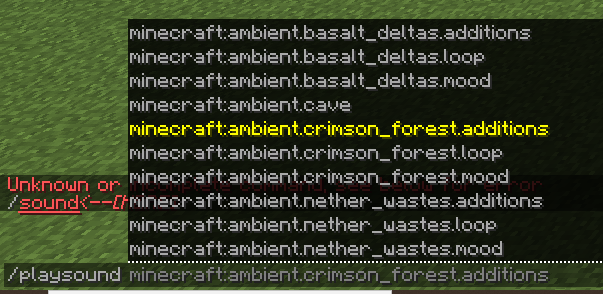
You may also use sounds from your server resource pack. You can find the default sound list online, like on this pastebin or even using the /sound auto command completer.