🔄 Item Updates (Revision)
When items are generated through loot tables or commands, their stat data is written into NBT tags. 90% of their stat data is now independent from what is written in the config, such that if you later modify an item, it will not automatically update the instances of this item that have already been generated.
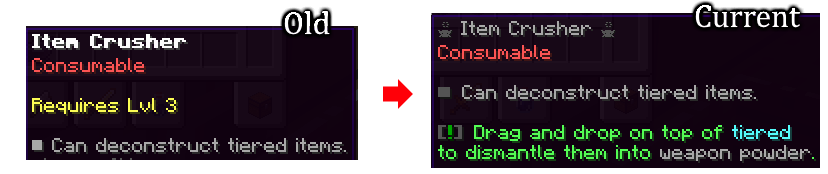
The Revision ID system, or RevID, allows to update generated items to match their configs again. When updating an item, MMOItems "regenerates" it, as if it was freshly obtained through the /mi give command, having the latest lore format and the same stats as the template:
The RevID stat
When you increase this number in the editor, all the copies of this item in the world will update to match the template:
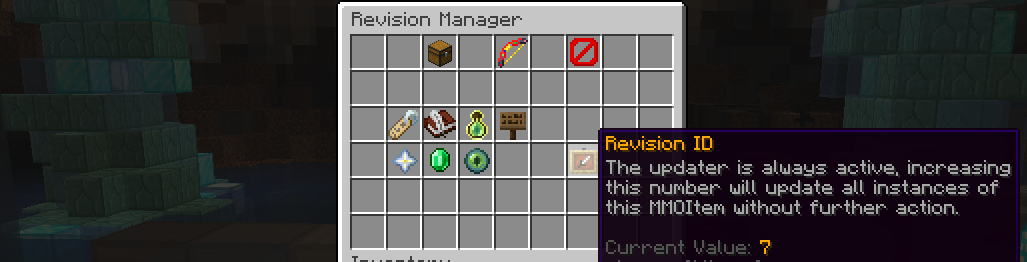
Once the item revision ID is incremented, every generated instance of that item is now considered outdated and will be updated. You can increment multiple times the revision ID.
Note
MMOItems updates every item in the player's inventory on login. Any item click (in a non creative inventory) triggers an item update check.
Advanced Configuration
There are a lot of options for this revision system, which you can tweak in the item-revision section of the main MMOItems config file.
item-revision:
  keep-data:
    display-name: true
    enchantments: true
    soulbound: true
    gems: true
    upgrades: true
    lore: false
    kept-lore-prefix: '&7'
    external-sh: true
    reroll: false
    modifications: true
    skins: true
    tier: true

  drop-extra-gems: true
Some options have more complicated mechanics, but the rest of these options are self-explanatory.
Reroll RNG Stats reroll
This option has some very complicated behaviour, stats may reroll even if you specified false, and this is desirable. It is important to understand that all numeric stats are RNG — even if you did not specify a spread, they just have 100% chance of the same value.
Suppose this is enabled, then all of the numeric stats of the item will be rerolled.
Suppose this is disabled, then each numeric stat will calculate the probability of it being generated again under the current mean and spread settings, if it is too rare then it will update/reroll even though this option was disabled:
- If the new value has a spread of 0 and has changed, the old value will be lost as it would be 0% of generating.
- If the value was removed entirely from the item, the old value will be lost.
- If the spread of the value has changed such that the old value is exceedingly rare (1 in 4200) then the old value will be lost.
- If the max spread value has changed, and the old value is outside this range, the old value will be constrained to the max spread.
As you can see, RNG will be rerolled if this item would be unobtainable under the new conditions, which is healthy game design.
Keep Enchantments enchantments
The old enchantments of the item will be compared to the enchantments in the template to decide if the enchantment will be kept or updated:
- Any old enchantment that is worse than that of the template will update to the better value
- If an old enchantment is better than that of the template, it will be kept as long as it is obtainable in vanilla minecraft.
- If the template has the
disable-enchantinganddisable-repairingstats enabled, no old enchantments will be kept even if this option is enabled, all enchantments will be updated to match the template.
As you can see, the aim is that players who enchant their items do not lose their enchantments, but if the item is updated in the template to have even better enchantments, these players will get the better enchantments. Essentially, attempts to remember the enchantments the player put in the item, and apply them again, if the player could still apply them.
Keep Gemstones gemstones, drop-extra-gems
Its important to note the drop-extra-gems option, if any gemstones would be deleted due to the RevID updater, setting this option to true will cause them to be given back to the player / dropped nearby if their inventory is full. This option is global to all item revision operations (see next section on more RevID system applications).
If this option is disabled, all old gems in the item will be deleted (~ or dropped if the drop-extra-gems option is enabled).
If this option is enabled, it is still possible for old gems to be deleted:
- If the template had its gem sockets removed or decreased in amount, gems that dont fit will be deleted
- If the color of the gem sockets changed, gems that do not fit anymore will be deleted
Keep Name display-name
If this is enabled, then the old name of the item will be kept, regardless of what the template currently has.
Keep Soulbound soulbound
If the old item is soulbound, this soulbound will be kept.
Keep Upgrades upgrades
The upgrade level of the old item will be kept, however this will fail if the item template has no upgrade template anymore. If the max upgrades of the item were decreased, the extra upgrade levels will be lost.
Keep Lore lore, kept-lore-prefix
From the old item, all the lines of lore that begin with the kept-lore-prefix (commonly a color code) will be kept. Be warned that this can cause duplicate lore if the template has any lore that begins with this prefix, it will be kept every time the item is updated.
Keep External SH external-sh
External stat history data is added by third-party plugins to modify stats of the item. Enabling this will keep all this data, with the exception of enchantments.
Keep Modifications modifications
All item modifiers will be kept if this is enabled, even if they cannot be obtained anymore, and even if the modifier weights changed.
Keep Skins skins
If this is enabled, changes made by a skin-type item will be kept.
Keep Tier tier
If the old item has a tier, this tier will be preserved, even if the template has now a different tier.
Other Applications of the RevID system
Updating gemstones inside items
The RevID system supports updating gemstones while they are inserted in items. This does not happen automatically when increasing the RevID of the gemstone template, you must increase the parent item's RevID and have the keep gemstones option enabled.
You can use the item-revision.keep-gem-data field to specify the RevID options of gemstones updated this way:
item-revision:
  keep-gem-data:
    display-name: true
    enchantments: true
    ...
Third Party Plugin Compatibilities
Keep Advanced Enchantments advanced-enchantments
All of the advanced enchantments in the item will be kept.
Update PhatLoots loot as it generates
PhatLoots does not have special support for MMOItems, such that after a few months, your MMOItem loot drops can become quite unupdated! Specify in MMOItems' config.yml in the section item-revision.phat-loots the revision options to update these items as they are generated:
item-revision:
  phat-loots:
    display-name: true
    enchantments: true
    #...