🪲 Frequent Issues
Use this list of common issues with MythicLib/MMOItems/MMOCore to self-diagnose your issue whenever you feel like something isn't right.
Sometimes support over the Discord server is pretty slow given the amount of tickets and staff availability. Before reporting a bug using a Discord ticket, please make sure your issue is not one of the following. If you can fix it yourself using the following instructions, you will both gain time (that you'd have lost waiting for an answer) and make staff gain time so that they can work on fixing more complex bugs.
Issues specific to one of the MMO plugins are marked with brackets, like Cannot cast abilities (MMOItems).
Always check your full server logs for plugin error logs because more than half the issues come with logs associated to them. Frequent issues that spawn with error logs are presented in the following list.
Keep MythicLib up-to-date
Keep in mind MythicLib is necessary to run MMOItems/MMOCore and that it is a plugin too. A MMOItems might be caused by a anterior MythicLib startup issue. Always make sure it's not a bug with MythicLib first.
Outdated Plugins
Error logs indicating a NoClassDefFoundError or NoSuchMethodError indicate that a plugin cannot find a class or method it was compiled with.
Could not load [...] in folder 'plugins' org.bukkit.plugin.InvalidPluginException: java.lang.NoClassDefFoundError: ...90% of the time, these errors are due to an outdated version of one of the MMO plugins or MythicLib. Download the latest releases/dev builds of all MMO plugins and try again.
Sometimes, these errors are due to a compatibility issue with external plugins, for instance if an external developer has changed something in their plugin API.
Plugin loading order issue
Severe plugin compatibility issues can happen when the MMO plugins don't load in a specific predefined order on server startup. It does sometimes happen with circular dependencies (A -> B -> C -> A), forcing Bukkit or Spigot to ignore soft dependencies. The most common issue is MythicMobs loading after all of the MMO plugins, which shouldn't happen at the required load order is the following:MythicMobs > MythicLib > MMOCore > MMOItems > MMOInventory
Recent versions of MythicLib contain a script that fews for circular dependencies. If you are having loading order issues, check the startup logs of MythicLib as they will most likely indicate a message that looks like this:Found a dependency cycle! Please make sure that the plugins involved load with no errors.
If you get such a message, you can either uninstall one of the plugins in the loop to break it, or try and correct the load order manually using the following fix. You can also contact the developers of the plugins involved as it unfortunately is up to them to fix that dependency cycle.
If you realize that MythicLib loads before MythicMobs for instance, one possible fix is to open the MythicLib.jar file and edit its plugin.yml internal file: by making MythicMobs a hard dependency you are forcing Bukkit to enable MythicMobs before MythicLib.
Previous plugin.yml:
# ....
softdepend: [ WorldGuard,Residence,Factions,MythicMobs,PlaceholderAPI ]
# ....
Fixed plugin.yml:
depend: [MythicMobs]
softdepend: [ WorldGuard,Residence,Factions,PlaceholderAPI ]
This is for your server start command to use plugin.yml if you are using paper/paper fork 1.19.2+
-Dpaper.useLegacyPluginLoading=trueDependency issue, preventing ML/MI/MC from starting
MMOItems, MMOCore and MMOInv assume that their dependencies had no issues loading. If any of the MMO plugin dependencies fail loading the MMO plugins will most likely disable as well. Always check your startup logs for error prior the MMO plugin error to make sure it's not an issue with a dependency.
For instance, if MythicMobs fails loading - either because of a configuration issue on the user end or a plugin bug -, MythicLib will probably not function properly and throw a startup error.
java.sql.SQLException: Column 'times_claimed' not found
Your MMOCore database it out of date due to a change in MMOCore 1.9. You can either update to MMOCore >1.9.5 or manually register the missing column. Updating your MySQL data table is fairly easy though, you just have to add a new string column called times_claimed (use the LONGTEXT data type):
ALTER TABLE mmocore_playerdata ADD COLUMN times_claimed LONGTEXT;Cannot break any block (MMOCore)
Please carefully read the following wiki page as you might not have configured your tool permission sets.
Health bar is stuck to 10 hearts
The health bar uses 10 hearts (equivalent to 20 HP) whatever maximum health you currently have. That option was implemented to allow server owners to utilize very large amount of health points without obstructing the player screen. You can disable this option in the main MythicLib config file. Since MythicLib 1.3.4 this option is now toggled OFF by default to reduce potential confusion.
Cannot invoke "io.lumine.mythic.core.skills.SkillExecutor.getSkill(String)" because "skillManager" is null
This issue sometimes happen when MythicMobs loads after the MMO plugins. Please refer to the issue above called Plugin loading order issue.
Color codes not working
MMOItems is currently transitioning to the MiniMessage format. If you have any issues with these please do report them in the issue tracker. Since ML 1.5 the MMO plugins are pretty lenient on what color codes you can use.
Here is a conversion table that indicates what tag corresponds to what color code
| Color Code | Tag | Alias | Color Code | Tag | Alias | |
|---|---|---|---|---|---|---|
&0 | <black> | <#000000> | &a | <green> | <#55FF55> | |
&1 | <dark_blue> | <#0000AA> | &b | <aqua> | <#55FFFF> | |
&2 | <dark_green> | <#00AA00> | &c | <red> | <#FF5555> | |
&3 | <dark_aqua> | <#00AAAA> | &d | <light_purple> | <#FF55FF> | |
&4 | <dark_red> | <#AA0000> | &e | <yellow> | <#FFFF55> | |
&5 | <dark_purple> | <#AA00AA> | &f | <white> | <#FFFFFF> | |
&6 | <gold> | <#FFAA00> | &k | <obfuscated> | <obf> | |
&7 | <gray> | <#AAAAAA> | &l | <bold> | <b> | |
&8 | <dark_gray> | <#555555> | &m | <strikethrough> | <st> | |
&9 | <blue> | <#5555FF> | &n | <underlined> | <u> | |
&o | <italic> | <i> | &r | <reset> | <r> | |
| Line break | <newline> | \n | Rainbow | <rainbow> | None |
You may also use <color:#FFFFFF> or <color:black> for colors, while the § character instead of & remains natively supported by Bukkit.
To create a horizontal gradient of colors: <gradient:[color1]:[color...]:[phase]>......</gradient> where [color] is a hex color or simply something like green. To create a vertical gradient of colors: <transition:[color1]:[color2]:[phase]>......</transition>
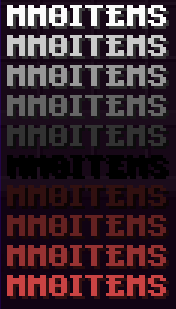
| Example Color Code | Picture |
|---|---|
<gradient:#FBEB19:#FD8C30><bold>MMOITEMS</gradient> |  |
<color:#FF0000><bold>MMOITEMS or <#FF0000><bold>MMOITEMS |  |
<transition:white:black:red:0.0><bold>MMOITEMS</transition><transition:white:black:red:0.1><bold>MMOITEMS</transition><transition:white:black:red:0.2><bold>MMOITEMS</transition><transition:white:black:red:0.3><bold>MMOITEMS</transition><transition:white:black:red:0.4><bold>MMOITEMS</transition><transition:white:black:red:0.5><bold>MMOITEMS</transition><transition:white:black:red:0.6><bold>MMOITEMS</transition><transition:white:black:red:0.7><bold>MMOITEMS</transition><transition:white:black:red:0.8><bold>MMOITEMS</transition><transition:white:black:red:0.9><bold>MMOITEMS</transition><transition:white:black:red:1.0><bold>MMOITEMS</transition> | |
Issue with FactionsBridge not loading
java.lang.NoClassDefFoundError: cc/javajobs/factionsbridge/FactionsBridge
You most likely have a Factions plugin installed. You need to install FactionsBridge which is a hard dependency when using any Factions plugin (it's like Vault but for factions). MythicLib has native support for most Factions plugins: you cannot deal skill damage to players within the same faction.
Mana from AureliumSkills not working on items (MMOItems)
Sometimes AureliumSkills integration will fail with MMOItems. You can diagnose this issue by using /mi debug info which will display most fields (level and mana) to 0 even though AureliumSkills action bar says otherwise.
This sometimes happen when reloading the server, in which case a simple relog will fix the issue on the player side. Just make sure you fully restart the server instead of using /reload, which often ends up messing stuff up with plugins.
Updating your server from <1.20.4 to 1.20.5+
Minecraft 1.20.5 changes how NBT tags are stored within items. While vanilla Minecraft makes sure to convert items placed inside of player and chest inventories, items stored in non-vanilla/external databases (MMOProfiles, MMOInventory...) are not automatically converted.
If you are updating your server from <1.20.4 to any version above, you have to convert your items stored in your MMOProfiles/MMOInventory databases to a format that does not depend on server version, upgrade your server, and convert the items back. Fortunately, MMOLib has a tool to have this done automatically. This tool comprises of one command and requires NBTAPI to be installed.
- Download NBTAPI from here and install it on your server.
- Close your server and backup your MMOProfiles/MMOInventory user data.
- Start your server in 1.20.4 or lower and make sure no players log in while performing the following steps.
- Run the commands
mmoprofiles convert-item-nbtsandmmoinventory convert-item-nbtsfrom the server console and wait for completion. Your items are now in a version-safe data format. - Close your server. You can now safely upgrade to 1.20.5+
- Start your updated server, run the following commands from the server console:
mmoprofiles convert-item-nbts fromandmmoinventory convert-item-nbts from(notice the second "from" parameter) and wait for completion.
- Run the commands
- You can now uninstall NBTAPI from your server. Players can now safely login again.
You can take your time after running the first command batch, just make sure no player logs in after using the commands and before you upgrade your server version. Otherwise, the player who logged in in the meantime will suffer from item NBT corruption.