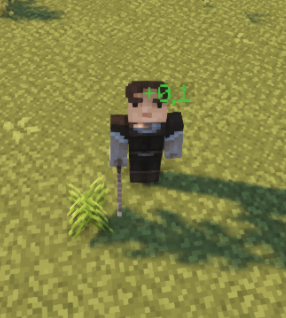
‼️ Damage Indicators
You can edit damage and regen indicators in the config file indicators.yml. MythicLib can use a wide range of popular holograms plugins to display regen/attack indicators around the target entity.
Basic Config
Default Config
damage_indicators:
# Enable/disable damage indicators alltogether
enabled: true
# Under 0.1 damage, no indicator will show
min_damage: 0.1
# Use format: 'ᜌ{icon} &f{value}ᜌ' along with the resource pack
# provided in the wiki in order to remove the gray background
format: '{icon} &f{value}'
decimal_format: '0.#'
custom_font:
enabled: false
normal:
'0': 'ᜀ'
'1': 'ᜁ'
'2': 'ᜂ'
'3': 'ᜃ'
'4': 'ᜄ'
'5': 'ᜅ'
'6': 'ᜆ'
'7': 'ᜇ'
'8': 'ᜈ'
'9': 'ᜉ'
'dot': 'ᜊ'
'inter': 'ᜍ'
crit:
'0': 'ᜐ'
'1': 'ᜑ'
'2': 'ᜒ'
'3': 'ᜓ'
'4': '᜔'
'5': '᜕'
'6': ''
'7': ''
'8': ''
'9': ''
'dot': 'ᜋ'
'inter': 'ᜍ'
# single => one indicator only
# packet => one indicator per damage packet (!!)
# type => one indicator per damage type
group_by: packet
damage_type_splits: [weapon, skill]
damage_type_icon_join: '' # Join by space character
icon:
weapon:
normal: '&c🗡'
crit: '&c&l🗡'
skill:
normal: '&6☄'
crit: '&6&l☄'
projectile:
normal: '&a➶'
crit: '&a&l➶'
physical:
normal: '&4✘'
crit: '&4&l✘'
magic:
normal: '&9✩'
crit: '&9&l✩'
split_holograms: true
holograms_join: ' ' # Split by space character
move: true
radial_velocity: 1
gravity: 1
initial_upward_velocity: 1
y_offset: 0.1
entity_height_percent: 0.75
r_offset: 0.5
entity_width_percent: 0.75
tick_period: 3
lifespan: 20You can edit the indicator formats using the format option. The icon section lets you configure the icons that correspond to every damage type.
Physics Options
When increasing radial_velocity the holo will fly farther away (if the holo plugin you're using supports moving holograms - some just don't -). Increasing the gravity option will make your holo fly faster to the ground. Conversely increasing initial_upward_velocity will make your holo fly higher. y_offset can be used if you want to apply a flat Y offset to the location where you're displaying the damage indicators. Last but not least, setting entity_height_percent to .75 - for instance - will have the holo display at 75% of the target entity's height (this then stacks up with the flat Y coordinate offset), and setting it to 100% will have it display at the top of the entity's bounding box.
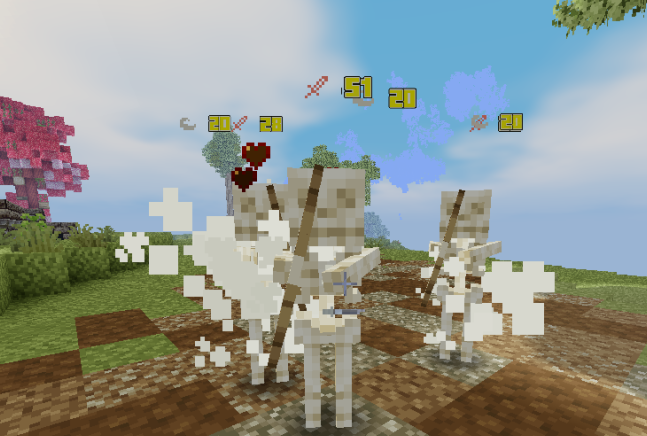
When toggling off move, holograms will be static and won't move from their initial position.
Holograms
When toggling on split_holograms, each icon will be displayed in its own hologram rather than all icons being displayed in the same hologram. When set to false, you can configure how the icons are joined together using the holograms_join config option. For instance, if you set it to a comma followed by a space " ", an indicator displaying both weapon and skill damage will show the weapon icon, then a comma and a space, then the skill icon. This would look like this: 🗡, ☄ (followed by the indicator damage value).
Using a custom font
Enable custom fonts by toggling on the custom_fonts.enabled config option. MythicLib will then replace any numeric character (0-9) with the character you specified in the config. You can also configure the character that ML is going to use for the decimal separator (dot) as well as a character that will be planed in between all the other characters.
Using custom textures you can then use a resource pack to have damage indicators with fully custom characters. Here is a resource pack that works with the default MythicLib config that you can check to understand how to use custom fonts within ML indicators.
groupby
The parameter group_by lets you choose how damage packets together to form indicators. There are three available options:
single: groups all damage packets to the entity in one single indicatorpacket: creates one indicator per damage packet, where each indicator displays the total damage of the packet and its list of damage types (one icon per damage type). This is the option most people would expect by default.type: you choose what damage types are displayed. With this option, you need to specify the damage types to split by in thedamage_type_splitsconfig option. For each damage type specified, one indicator will be created displaying the total damage of that type. If a damage type is not present in the damage packet, no indicator will be created for it.
In case a single hologram contains multiple damage type icons, you can configure how the icons are joined together using the damage_type_icon_join config option. For instance, if you set it to a comma followed by a space " ", an indicator displaying both weapon and skill damage will show the weapon icon, then a space, then the skill icon. This would look like this: 🗡 ☄ (followed by the indicator damage value).
Example
Let's say that a player just hit a mob with a 100 Atk Damage weapon (Physical, Weapon damage). An on-hit skill triggers, dealing 30 Skill, Magic damage. Finally, elemental stats present on the item deal an additional 20 Fire-Weapon damage.
| Mode | Resulting Indicators | Comment |
|---|---|---|
single | 🗡☄✘ 150 | One single indicator |
packet | 🗡✘ 100, ☄✩ 30, 🔥🗡 20 | One per packet |
type | 🗡 120, ☄ 30 | One per damage type specified |
Regen/Heal Indicators
They share most of their options with damage indicators. These appear when regenerating health through potions, natural regeneration, skills... You can also apply custom fonts to regen indicators following the same syntax as with damage indicators.
Default Config
regen_indicators:

  # Enable/disable damage indicators alltogether
  enabled: false

  # Under 0.1 health regen, no indicator will show
  min_regen: 0.1

  # Use format: 'ᜌ{icon} &f{value}ᜌ' along with the resource pack
  # provided in the wiki in order to remove the gray background
  format: '&a+{value}'
  decimal_format: '0.#'

  custom_font:
    enabled: false
    '0': 'ᜀ'
    '1': 'ᜁ'
    '2': 'ᜂ'
    '3': 'ᜃ'
    '4': 'ᜄ'
    '5': 'ᜅ'
    '6': 'ᜆ'
    '7': 'ᜇ'
    '8': 'ᜈ'
    '9': 'ᜉ'
    'dot': 'ᜊ'
    'inter': 'ᜍ'

  move: true
  radial_velocity: 1
  gravity: 1
  initial_upward_velocity: 1
  y_offset: 0.1
  entity_height_percent: 0.75
  r_offset: 0.5
  entity_radius_percent: 0.75
  tick_period: 3
  lifespan: 20