🌱 Elements
Elements are a big part of a RPG server. Using MythicLib custom elements, you can create elemental attacks with fully configurable attack effects. You can also setup elemental critical strikes which are attacks that have some chance of triggering when dealing elemental damage. Custom elements were introduced in MythicLib 1.3.4
The config file you'll be editing is /MythicLib/elements.yml
Elemental attacks
Skills can be used to deal elemental damage using the following MythicMobs mechanic where you can replace FIRE with any element identifier.
mmodamage{amount="10";types=PHYSICAL,WEAPON;element=FIRE}Elemental attacks also trigger when performing weapon (melee or ranged) attacks.
Damage Calculation
Incoming Damage
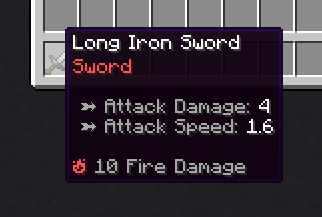
There are two different stats for increasing a player's elemental damage. You can either give a flat amount of elemental damage like this item. The following item deals an extra 10 damage on hit. The corresponding stat is <ELEMENT_NAME>_DAMAGE, for instance FIRE_DAMAGE.
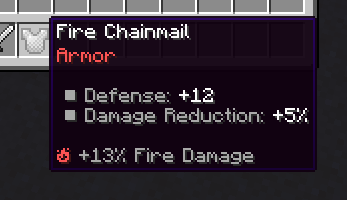
You can also use <ELEMENT_NAME>_DAMAGE_PERCENT which will increase your elemental damage by a certain coefficient. For instance, wearing the following item will increase your Fire Damage by 13%. Since it's a damage multiplier, you won't deal any fire damage if you have no item dealing base/flat damage.
Defense
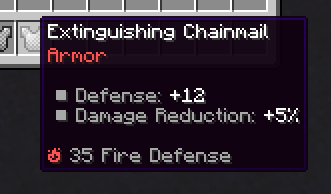
Elemental defense reduces incoming elemental damage. The stat <ELEMENT_NAME>_DEFENSE provides flat defense while <ELEMENT_NAME>_DEFENSE_PERCENT provides X% extra elemental defense points.
Weakness
Elemental weakness increases elemental damage taken by a certain factor. For instance, 10% Fire Weakness will increase incoming fire damage by 10%. The corresponding player stat is <ELEMENT_NAME>_WEAKNESS.
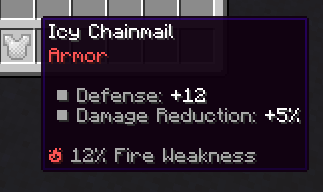
Final Formula
Here are the formulas that summerizes all the previous explanations. The last formula uses the default MythicLib defense formula.
Effective Damage  = <Flat damage> * (1 + <Extra damage>) * (1 + <Opponent weakness>)
Effective Defense = <Flat opponent defense> * (1 + <Extra opponent defense>)
Damage Mitigation = <Defense> / (<Defense> + 5 * <Damage>)
Element Config Example
FIRE:

    # Main translation MMOCore and MMOItems will use
    name: Fire

    icon: BLAZE_POWDER # Purely cosmetic, used in the MMOItems item editor
    lore-icon: '🔥' # Used in the MMOItems item lore
    color: '&c' # Used in the MMOItems item lore

    # What gets executed when a normal elemental is performed
    regular-attack:
        mythiclib-skill-id: fire_elemental_attack

    # What gets executed when a elemental critical strike is performed
    # This one is optional. If not specified, no crits can occur
    crit-strike:
        mythiclib-skill-id: fire_critical_strike
There's one config section per element and you are free to add, edit and remove any config section. Once you're done editing you can use /ml reload which will reload the new config into MythicLib. Then hit /mi reload or /mmocore reload to have the changes propagate to MMOItems and MMOCore.
The name, icon, lore-icon and color options are all cosmetic. The most importants are regular-attack which is the skill that is cast by the attacker when performing an elemental attack, and crit-strike which is the skill cast when performing an elemental critical strike. By default, MythicLib uses custom scripts to handle these attack skills yet you can use other plugins like MythicMobs or Fabled.
Using other skill plugins
Just change mythiclib-skill-id to mythicmobs-skill-id (and indicate the right MM skill identifier) if you'd like to use a MythicMobs skill. You can also use fabled-skill-id if you're using Fabled. This is the same config section but with that small config key change:
FIRE:
    name: Fire
    icon: BLAZE_POWDER
    lore-icon: '🔥'
    color: '&c'
    regular-attack:
        mythicmobs-skill-id: fire_elemental_attack
    crit-strike:
        mythicmobs-skill-id: fire_critical_strike
Elemental Attack Effects
MythicLib comes with preconfigured on-hit attack effects for every element although you can definitely adapt them to your likings.
By default, elemental on-hit attack effects are implemented using MythicLib scripts, which can be found inside MythicLib/script/elemental_attacks.yml. These on-hit effects depend on the element applied.
| Element | Crit Effect |
|---|---|
| Fire | Sets target entity on fire (duration scales with atk damage) |
| Ice | Roots target entity (duration scales with atk damage) |
| Wind | Area-of-effect knockback |
| Earth | Area-of-effect knock-up |
| Thunder | Deals 20% of the initial atk damage to nearby entities |
| Water | Area-of-effect slow (duration scales with atk damage) |
Damage Indicators
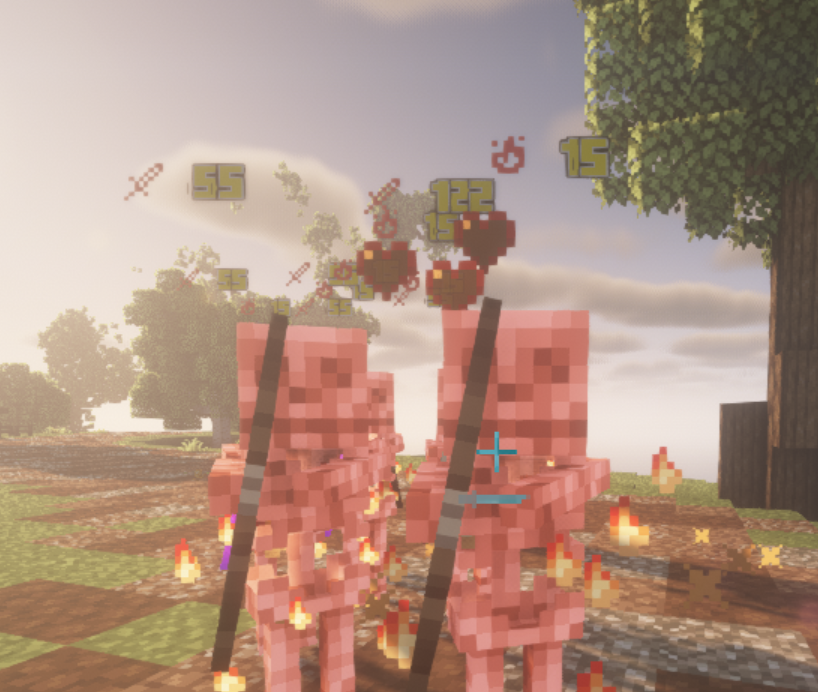
Elemental damage dealt is displayed when damaging entities. Learn more about damage indicators on this wiki page. On the following screenshot, on can see two holograms of 15 Fire Damage dealt to the mob, along with the flame particles of the on-hit attack effect.