🗒️ Config Options
Removing damage particles
Some servers use very high damage values which can summon way too many damage particles on the client side. This can cause FPS drops and deeply lower user experience. In order to fix that we've integrated a damage particle cap in MythicLib which lets you control the amount of damage particles displayed. Head to the MythicLib config.yml file:
damage-particles-cap:
  max-per-tick: 10
  enabled: false
Enable this option by toggling on the enabled option and input the value you want for the max-per-tick option. This corresponds to the maximum amount of particles emitted by one entity in ONE tick.
Health Scale
Health scaling is a small sized RPG feature which makes the player health bar always display the same amount of hearts (while still having extra max. health). When scaling your health to 40 (default value), the player health bar will always display 2 rows (2 * 20) of hearts.
With health scale disabled: 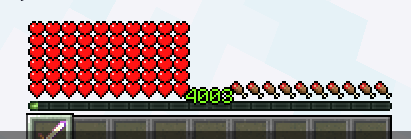
With health scale enabled: 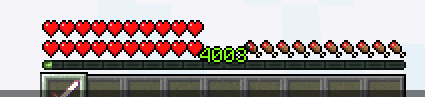
You can configurate the health scale feature in the MythicLib main config file. It is pretty self explanatory:
# Allows to scale health up/down to a specific amount
# so extra max health does not fill up the screen.
health-scale:
    enabled: true
    scale: 40
Vanilla Damage Modifiers
Change the amount of damage dealt on specific damage sources. This tool comes handy when needing to balance your vanilla damage sources. You can use any math formula for any damage source possible. Available damage sources can be found in spigot docs.
Using {event_damage} will return the initial event damage.
vanilla-damage-modifiers:
  enabled: false
  source:
    VOID: '%mythiclib_stat_max_health% * .05' # Deals 5% of player's max health
    FIRE: '{event_damage} * 2' # Multiplies by 2 fire damage
    WITHER: '%mythiclib_stat_max_health% * .05'
    LAVA: '%mythiclib_stat_max_health% * .2'
    DROWNING: '%mythiclib_stat_max_health% * .1'