🐜 Reporting a bug
With the important amount of plugin users it is more important than ever to spend some time on properly drafting issue tickets. Even with limited config/dev experience, most of the following instructions will take you at most a few minutes of your time, and might spare you and the support & dev team several hours.
WARNING
Do not use Gitlab tickets for support requests. Your ticket will be closed and you will be asked to join the Discord server for community & staff assistance.
Use up-to-date plugin builds
Unless staff specifically told you to temporarily downgrade to a lower plugin version, always make sure you are using the latest version available for MythicLib, MMOItems, MMOCore AND MythicMobs. MythicLib is a hard dependency for any MMO plugin and also needs to be kept up-to-date. Due to plugin code dependencies and frequent code updates, you might have to simultaneously update all of the MMO plugins. These plugin requirements are ALWAYS indicated in the plugin changelogs.
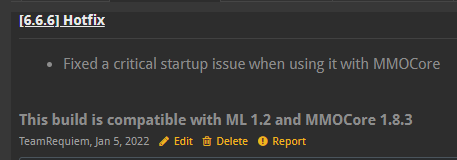
When using development builds (available on the official website), keep in mind there might be several weeks/months worth of work between the latest dev build and spigot release. Therefore, when using a dev build for any of the MMO plugins, you have to use dev builds for all the plugins simultaneously. More information here.
Look for your issue in the Frequent Issues wiki page
There are bugs due to your specific server or plugin configuration which you can fix on your own. This will not only save you some time waiting for an answer on the Discord server, but this will also save us some time.
Look for similar issues in the Issue Tracker
All closed issue tickets are archived, though you can still access them. Look for similar issues that have already been solved by other users, you might find your solution there. If you are reporting an existing issue, look for existing open tickets and provide more information there in order to reduce duplicates. Otherwise, open a new ticket!
Read your console error logs
This might sound dumb but if everyone read plugin error logs the Use up-to-date plugin builds section would be pretty much useless, as everytime a startup bug occurs with any plugin, Bukkit displays [..] [Server thread/ERROR]: Error occurred while enabling ... (Is it up to date?) in the console.
While most of the time error logs are 99% stack trace which you won't be able to read, error messages developers leave here and there might help you fix your issue on your own.
Something you should do everytime when seeing a plugin error stack trace is use CTRL+F and look for plugin startup error logs which always start with Error occurred while enabling .... If you see any of these startup errors, you are pretty much guaranteed the plugin will NOT function properly as it failed to enable, given your server and plugin configurations. These startup issues should be reported in priority if you don't see them in the Frequent Issues wiki page.
How to report a bug
If all of this didn't help you can open an issue ticket on Gitlab, or come talk to us on our Discord server as this could definitely be a plugin bug. When reporting an issue, please try to provide as much information as possible:
- Provide a concise description of your problem
- Find an (easy) way to reproduce your issue and provide the steps
- Pastebin relevant server logs (specific startup issues or full logs if you're unsure)
- Provide MMO/Mythic plugin builds used ("All latest spigot builds" or "All latest dev builds" is sufficient)
- Provide any related plugin configuration file (MMOItems item configs, MMOCore class config, ML/MI/MM skill configs etc.)
What you can do to make our lives easier:
- Provide videos or screenshots; these are definitely appreciated when reproducing or describing complex issues.
- Give the plugin a try on a fresh server setup. This will wipe out most of the issues due to your plugin or server configuration.
- Do NOT just say "... doesn't work" because it's insufficient 90% of the time. Specify everything that you have tried to get it working, and provide relevant configs or logs.
- Do not provide huge configuration files where 90% is unrelated to the issue you're dealing with. Find the SIMPLEST config setup which efficiently isolates the bugged feature
- Do NOT use screenshots to provide console logs
| MMOItems | MMOCore | MMOProfiles | MMOInventory | MythicLib |
|---|---|---|---|---|
| Issue Tracker | Issue Tracker | Issue Tracker | Issue Tracker | Issue Tracker |
Requesting a new feature
You should try and follow the previous guidelines as much as possible when asking for a new plugin feature. Admittedly most of the time a simple description will be sufficient if it is clear enough (like if you're asking for a new PAPI placeholder or anything pretty simple), yet for more complex features it is better to provide as much information as possible:
- quickly give some context
- highlight what the plugin is lacking (why something needs to be changed/added)
- provide a solution (suggest as many ideas as possible and explain them precisely)
- try and explain how useful it would be (this will make the devs more likely to implement it quickly)
Similarly images, videos or simple schemes can help you explain what exactly you want added.
Make sure your feature hasn't already been suggested using the search bar! This will also reduce dupe tickets.